> ## Documentation Index
> Fetch the complete documentation index at: https://docs.klyra.ai/llms.txt
> Use this file to discover all available pages before exploring further.
# Brand Voice
> Let Klyra AI be your brand’s memory bank. With Brand Voice, your unique identity is captured once and applied everywhere — saving time, ensuring consistency, and letting your brand shine across all AI-generated content.
## Introduction
The [**Brand Voice**](https://klyra.ai/page/brand-voice) feature allows you to **train Klyra AI on your brand’s identity**. Instead of repeatedly explaining your company details, target audience, or products, you define them once and let Klyra AI remember.
This ensures:
* **Consistency** — Your brand’s tone, style, and messaging are unified across all generated content.
* **Efficiency** — No more retyping introductions or product details.
* **Personalization** — AI content reflects your exact company identity and offerings.
Brand Voice can be applied across almost all **text and conversation-related tools** in Klyra AI, such as **AI Writer, AI Chat Assistants, AI File & Web Chat, AI RSS, AI YouTube**, and more.
This feature is available only with a paid subscription plan.
## How to Use
> 🔎 **Navigation:** Dashboard → Left Panel → Productivity → Brand Voice
* Click **Add New Brand**.
Fill in the following details:
* **Company / Brand Name**
* **Website**
* **Industry**
* **Tagline**
* **Target Audience**
* **Tone of Voice** (e.g., professional, friendly, witty, authoritative)
* **Company / Brand Description**
* **Products or Services** offered by your company
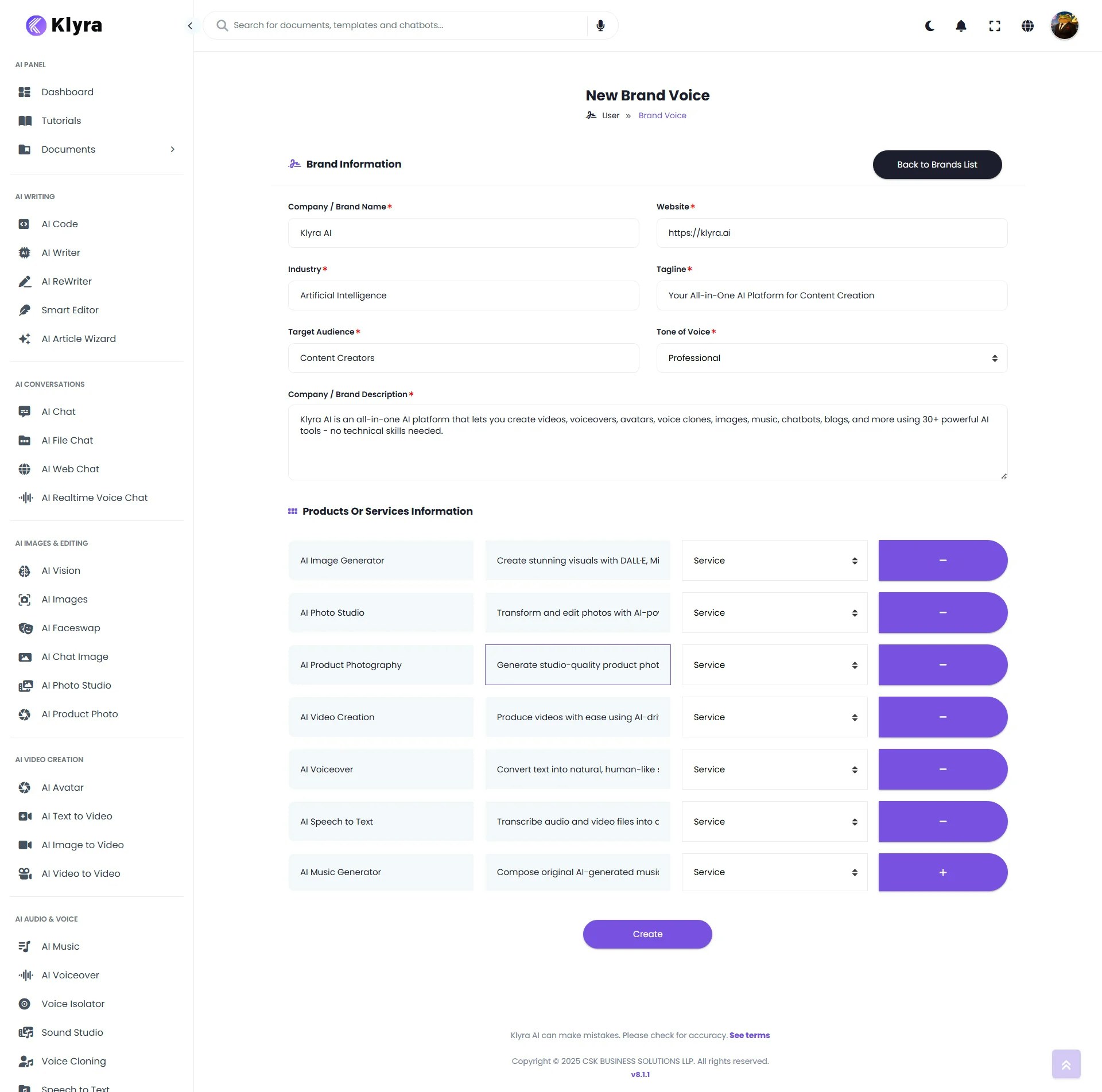 * After filling out the details, click **Create**.
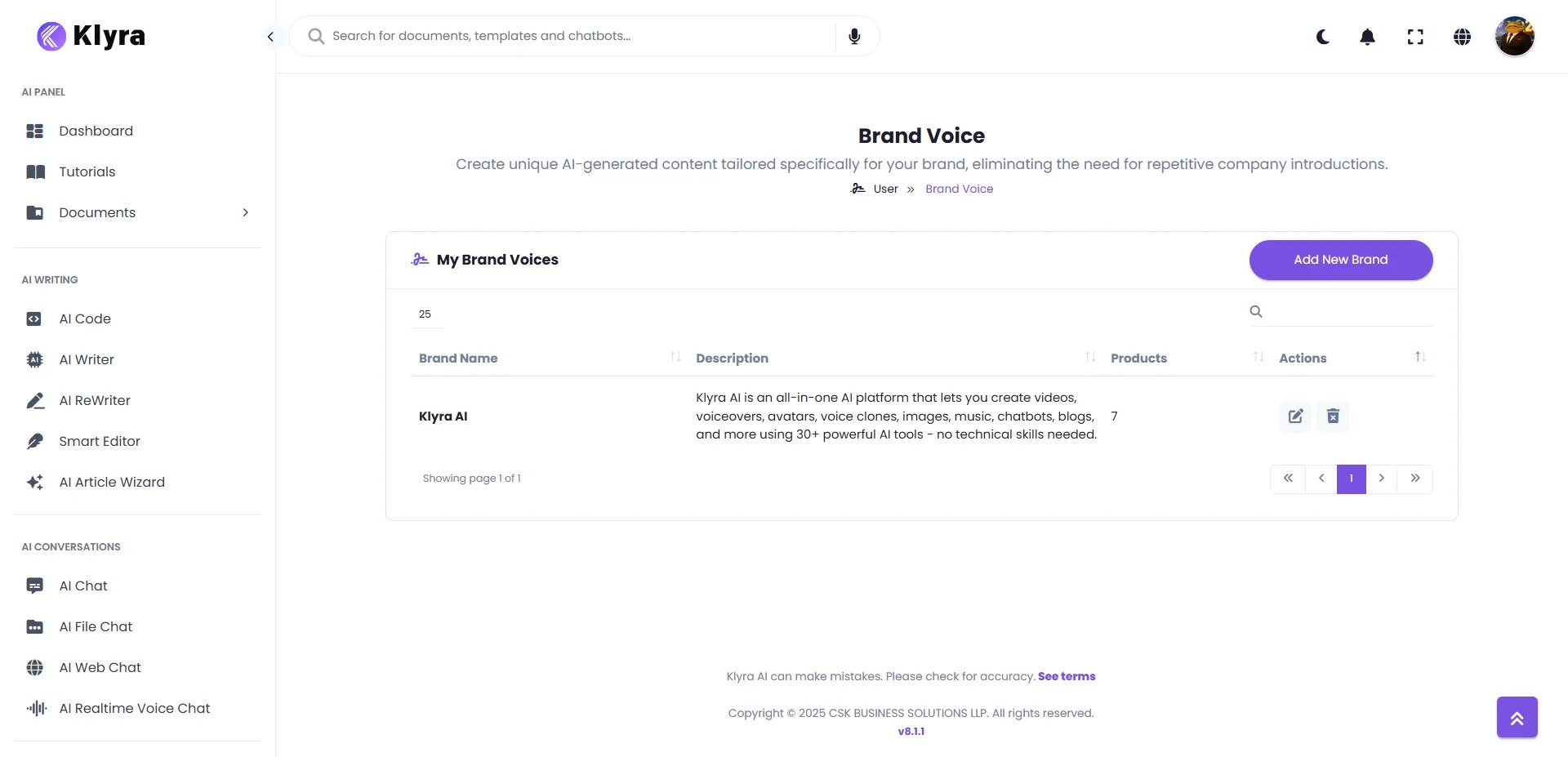
* Your brand voice will now be available across the platform.
* After filling out the details, click **Create**.
* Your brand voice will now be available across the platform.
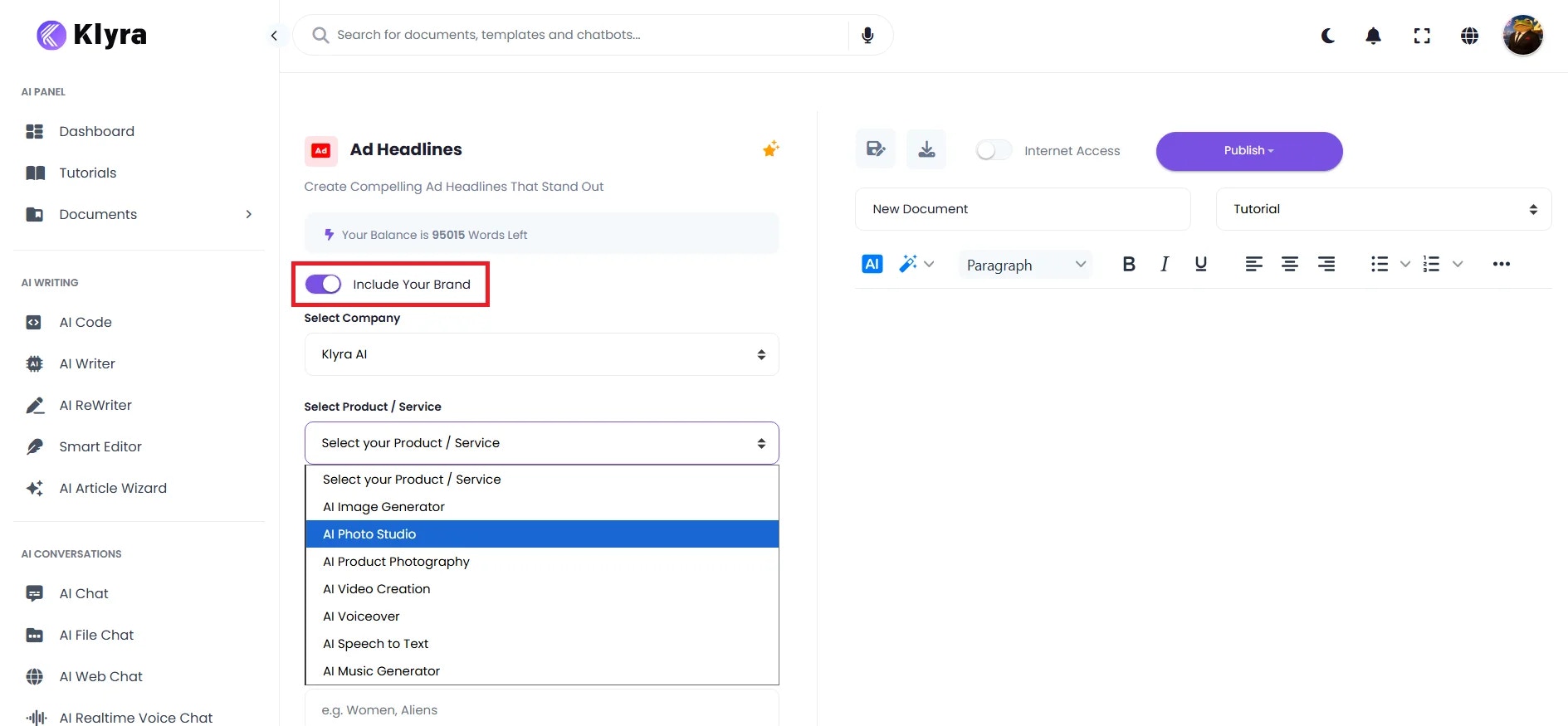
 * When using supported tools (e.g., AI Writer, AI Chat Assistants, AI RSS), you’ll see an **Include Your Brand** toggle.
* Toggle it **On**.
* Two dropdowns appear:
* **Select Your Brand**
* **Select Product/Service**
* Once enabled, AI will automatically tailor its responses and outputs to your brand voice, saving you from repetitive introductions.
* When using supported tools (e.g., AI Writer, AI Chat Assistants, AI RSS), you’ll see an **Include Your Brand** toggle.
* Toggle it **On**.
* Two dropdowns appear:
* **Select Your Brand**
* **Select Product/Service**
* Once enabled, AI will automatically tailor its responses and outputs to your brand voice, saving you from repetitive introductions.
 ### 💡 Tips
* **Be Detailed in Setup** — The more specific you are with brand description, products, and audience, the more accurately AI reflects your voice.
* **Use Tone Keywords** — Add clear descriptors like *professional, casual, witty, empathetic, authoritative* to guide AI tone.
* **Create Multiple Voices** — If your brand serves different audiences (e.g., corporate clients vs. young consumers), set up separate brand voices for each.
* **Refine Over Time** — Update your brand information as products, taglines, or campaigns evolve.
* **Leverage Across Tools** — Always toggle **Include Your Brand** when using AI Writer, Chat Assistants, or other text tools to keep content consistent.
* **Save Time with Product Selection** — Use the product/service dropdown to skip retyping product details in every interaction.
### 📌 Example Use Cases
* **Content Marketing Teams**\
Generate blog posts, newsletters, or social media captions that **always match your brand tone**.
* **Customer Support Teams**\
Use **AI Chat Assistants** with Brand Voice enabled to ensure consistent **tone and messaging** in responses.
* **E-commerce Stores**\
Create product descriptions that follow your **brand guidelines** without re-explaining your catalog.
* **Agencies**\
Manage multiple client brands by creating **separate Brand Voices** for each, and switch between them easily.
* **Corporate Communications**\
Publish press releases, announcements, or training material aligned with the company’s official voice.
### 💡 Tips
* **Be Detailed in Setup** — The more specific you are with brand description, products, and audience, the more accurately AI reflects your voice.
* **Use Tone Keywords** — Add clear descriptors like *professional, casual, witty, empathetic, authoritative* to guide AI tone.
* **Create Multiple Voices** — If your brand serves different audiences (e.g., corporate clients vs. young consumers), set up separate brand voices for each.
* **Refine Over Time** — Update your brand information as products, taglines, or campaigns evolve.
* **Leverage Across Tools** — Always toggle **Include Your Brand** when using AI Writer, Chat Assistants, or other text tools to keep content consistent.
* **Save Time with Product Selection** — Use the product/service dropdown to skip retyping product details in every interaction.
### 📌 Example Use Cases
* **Content Marketing Teams**\
Generate blog posts, newsletters, or social media captions that **always match your brand tone**.
* **Customer Support Teams**\
Use **AI Chat Assistants** with Brand Voice enabled to ensure consistent **tone and messaging** in responses.
* **E-commerce Stores**\
Create product descriptions that follow your **brand guidelines** without re-explaining your catalog.
* **Agencies**\
Manage multiple client brands by creating **separate Brand Voices** for each, and switch between them easily.
* **Corporate Communications**\
Publish press releases, announcements, or training material aligned with the company’s official voice.