> ## Documentation Index
> Fetch the complete documentation index at: https://docs.klyra.ai/llms.txt
> Use this file to discover all available pages before exploring further.
# AI Writer
> Generate high-quality content instantly with 70+ prebuilt templates or create your own custom templates. Enhance your workflow with real-time web access, flexible creativity controls, and seamless publishing options.
## Introduction
The [**AI Writer**](https://klyra.ai/page/ai-writer) tool in Klyra AI revolutionizes content creation with **over 70 prebuilt templates** across 10 categories: **Ads, Blog Posts, Content, E-commerce, Emails, Frameworks, Marketing, Social Media, Video, Websites, and Music**.
Whether you’re drafting social posts, marketing campaigns, blog articles, or website copy, AI Writer provides customizable options for tone, creativity, and AI model selection. You can also create **custom templates**, export results in multiple formats, and even publish directly to WordPress.
## How to Use
> 🔎 **Navigation:** Dashboard → Left Panel → AI Writing → AI Writer
This opens the **AI Writer tool page** in the main area.
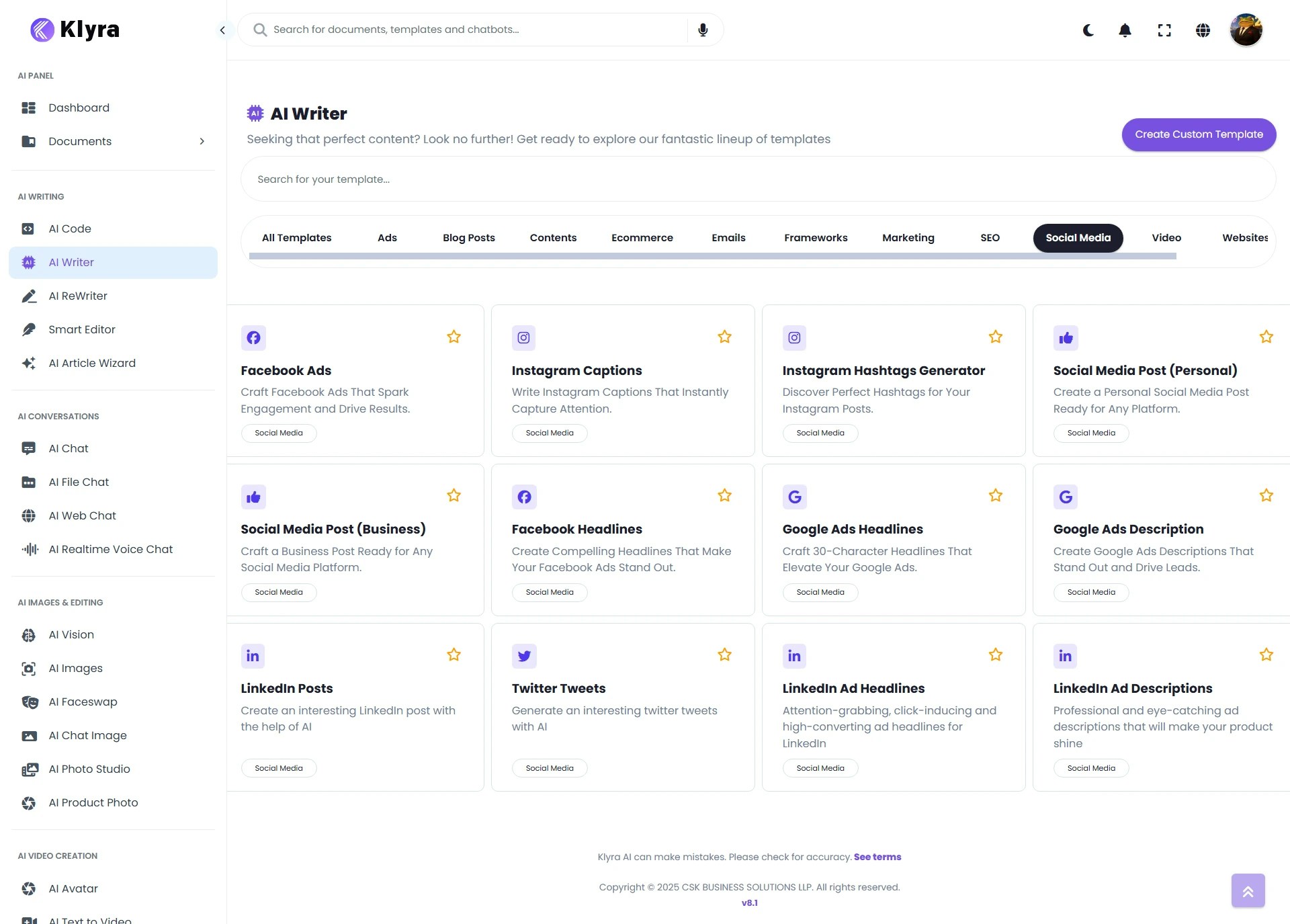 * Browse the **70+ prebuilt templates** grouped under categories.
* Use the **search bar** (above the list) to quickly find a template.
* To build your own, click **Create Custom Template** (top-right).
* Click on a template to configure it.
* For example, choose **Twitter Tweets – Generate an interesting Twitter tweet with AI**.
Inside the template editor, you’ll see several options:
1. **Internet Access** – Toggle ON/OFF (default: OFF). When enabled, the AI fetches **real-time data** from Internet.
2. **Input Language** – Select the language in which you want the content.
3. **Tweet Description** – Enter the topic or idea you want to tweet about.
4. **AI Model** – Pick from available models under your subscription.
5. **Creativity** – Choose how original the output should be:
* *Original (default), Repetitive, Deterministic, Creative, Imaginative*
6. **Tone of Voice** – Adjust the style of your content:
* *Professional (default), Exciting, Friendly, Witty, Humorous, Convincing, etc.*
7. **Estimated Result Length** – Define approximate word count (e.g., 500 words).
* Click **Generate**.
* Your result will appear on the **right side of the main area**.
* Browse the **70+ prebuilt templates** grouped under categories.
* Use the **search bar** (above the list) to quickly find a template.
* To build your own, click **Create Custom Template** (top-right).
* Click on a template to configure it.
* For example, choose **Twitter Tweets – Generate an interesting Twitter tweet with AI**.
Inside the template editor, you’ll see several options:
1. **Internet Access** – Toggle ON/OFF (default: OFF). When enabled, the AI fetches **real-time data** from Internet.
2. **Input Language** – Select the language in which you want the content.
3. **Tweet Description** – Enter the topic or idea you want to tweet about.
4. **AI Model** – Pick from available models under your subscription.
5. **Creativity** – Choose how original the output should be:
* *Original (default), Repetitive, Deterministic, Creative, Imaginative*
6. **Tone of Voice** – Adjust the style of your content:
* *Professional (default), Exciting, Friendly, Witty, Humorous, Convincing, etc.*
7. **Estimated Result Length** – Define approximate word count (e.g., 500 words).
* Click **Generate**.
* Your result will appear on the **right side of the main area**.
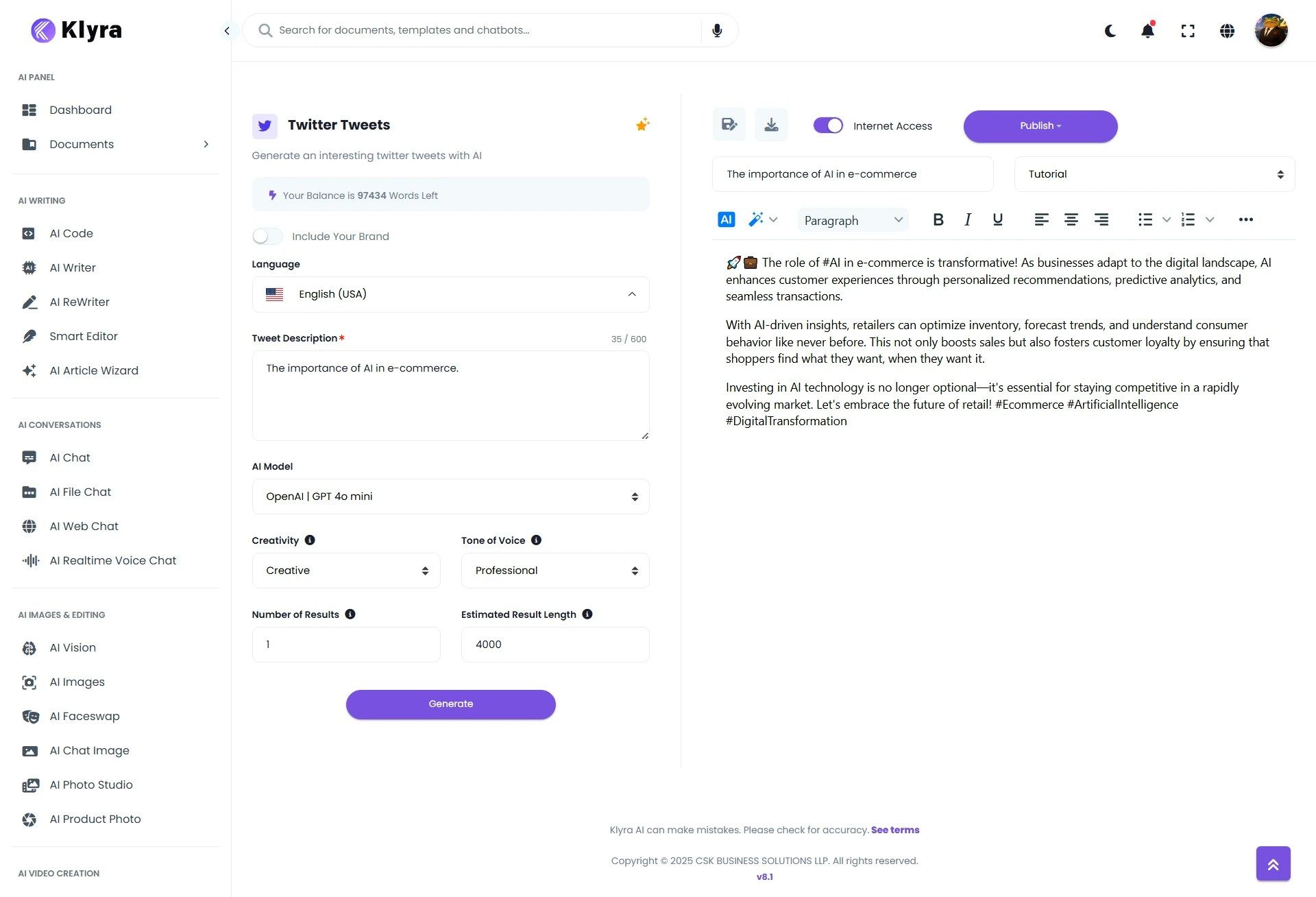 * **Save** → Name the document and click on **Save** to store the content in **AI Panel → Documents** for future reference.
* **Download** → Export in **Text, HTML, or Word (DOCX)** formats.
* **Publish** → If your WordPress site is linked via\
**Dashboard → Left Panel → AI Connect & Integrations → Integrations → WordPress Integration**, you can publish directly from AI Writer.
## 📌 Example Use Cases
* **Marketing Teams:** Draft Google Ads copy, social campaigns, and product descriptions in minutes.
* **Content Creators:** Generate blog posts, scripts, and story outlines.
* **E-commerce Stores:** Write persuasive product descriptions and customer emails.
* **Social Media Managers:** Quickly create engaging tweets, captions, and threads.
* **Startups & SMBs:** Save costs on copywriting by using AI-powered templates.
* **Custom Templates:** Build domain-specific templates (e.g., *HR Job Descriptions*, *Legal Summaries*, *Investor Updates*).
* **Save** → Name the document and click on **Save** to store the content in **AI Panel → Documents** for future reference.
* **Download** → Export in **Text, HTML, or Word (DOCX)** formats.
* **Publish** → If your WordPress site is linked via\
**Dashboard → Left Panel → AI Connect & Integrations → Integrations → WordPress Integration**, you can publish directly from AI Writer.
## 📌 Example Use Cases
* **Marketing Teams:** Draft Google Ads copy, social campaigns, and product descriptions in minutes.
* **Content Creators:** Generate blog posts, scripts, and story outlines.
* **E-commerce Stores:** Write persuasive product descriptions and customer emails.
* **Social Media Managers:** Quickly create engaging tweets, captions, and threads.
* **Startups & SMBs:** Save costs on copywriting by using AI-powered templates.
* **Custom Templates:** Build domain-specific templates (e.g., *HR Job Descriptions*, *Legal Summaries*, *Investor Updates*).