> ## Documentation Index
> Fetch the complete documentation index at: https://docs.klyra.ai/llms.txt
> Use this file to discover all available pages before exploring further.
# AI Code
> Generate, iterate, and save code snippets in seconds. AI Code accelerates development by producing working code in your chosen language and model based on clear instructions.
## Introduction
Revolutionize your coding workflow with an intelligent code generator that supports 16 programming languages and GPT models from OpenAI. AI Code helps you prototype functions, generate utility modules, or scaffold features quickly. The tool is designed for both experienced developers and learners, providing readable, reusable code you can review, test, and integrate into your projects.
Always review and test generated code before using it in production. AI output may contain errors, security issues, or incomplete edge case handling.
## How to Use AI Code
To get started, go to the **AI Writing** in the left panel and click on the **AI Code** tab.
Follow these steps to generate code with AI Code.
Choose the target language from the dropdown. The tool supports 16 languages, for example:
* C, C#, C++
* Java, PHP, Python
* Ruby, Perl, Shell
* JavaScript, TypeScript
* Go, Swift, Rust
Enter a clear description of the function or code you want. Include:
* Purpose and expected behavior
* Input parameters and types
* Return values or output format
* Any library or framework requirements
* Constraints such as performance, memory, or compatibility
> **Example instruction:**
>
> Create a Python function `merge_sorted_lists(a, b)` that merges two sorted lists into one sorted list.
>
> Include unit tests using pytest and handle empty lists.
Select the GPT model available under your subscription. Higher-capacity models typically produce more accurate and idiomatic code.
Press the Generate Code button to run the model. Processing time depends on model choice and prompt complexity.
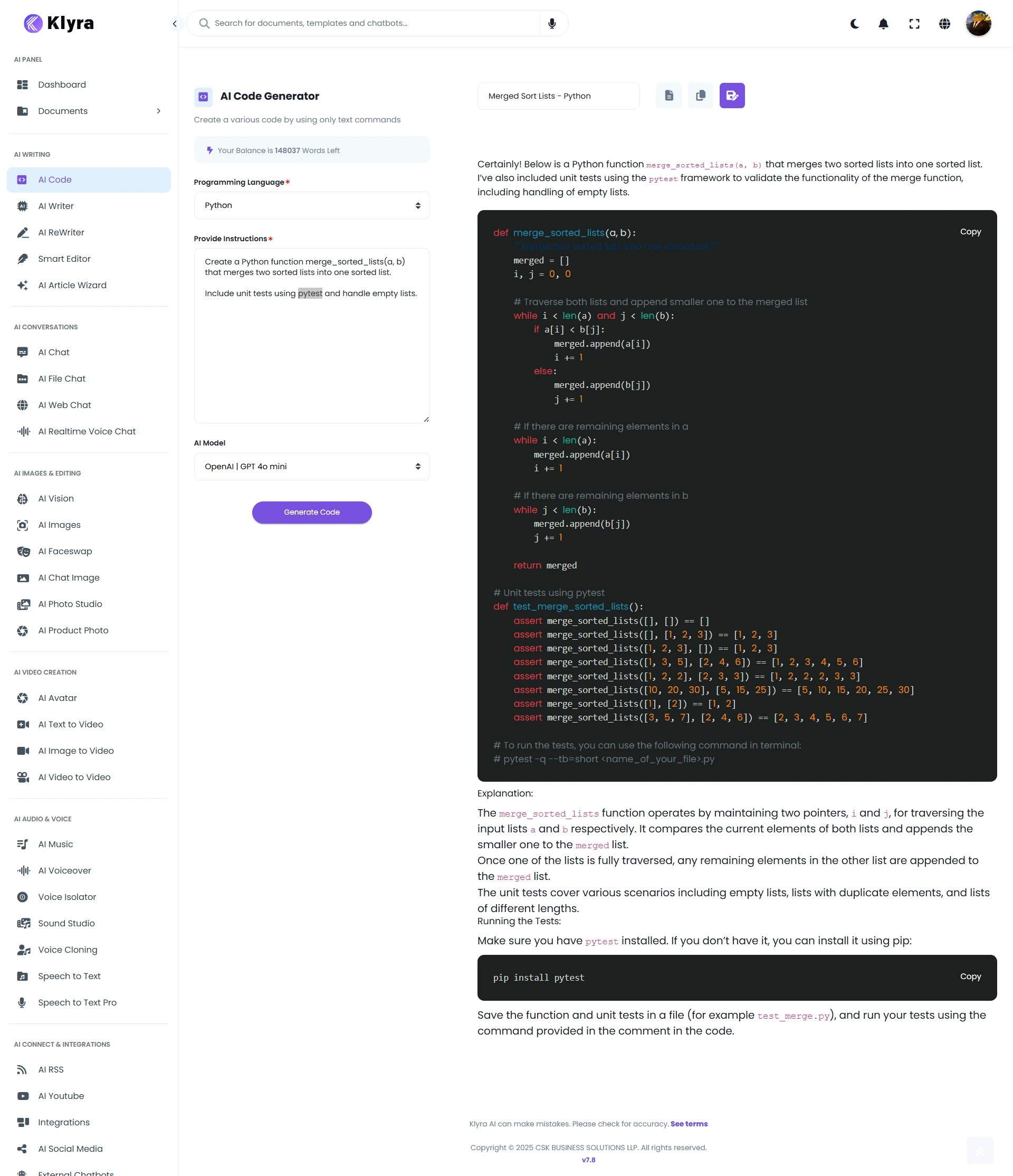 * The generated code appears in the right panel.
* Above the generated code you will find buttons to:
* **Name** the code or give the document a title
* **Save** the document to All Codes in the **AI Panel**
* **Download** the file to your device
* **Copy** the code to clipboard
Use the Name field to keep your repository organized before saving.
### 💡 Tips
* Provide example input and expected output to improve accuracy.
* Specify the coding style you prefer, for example PEP8 for Python or Google style for Java.
* Ask for unit tests and docstrings to make generated code easier to verify.
* Keep prompts focused and concise for predictable results.
### 📌 Example Use Cases
* **Function Generation**: Quickly create reusable functions or scripts based on natural language instructions.
* **Code Acceleration**: Speed up development by generating boilerplate code for APIs, classes, or modules.
* **Learning Aid**: Beginners can learn syntax and best practices across 16+ programming languages by studying generated examples.
* **Debugging Support**: Ask AI Code to reframe or rewrite problematic logic in a cleaner way.
* **Cross-Language Conversion**: Transform snippets from one language (e.g., Python) into another (e.g., Java or C#).
* **Prototyping**: Generate working prototypes quickly, then refine them manually for production readiness.
Provide clear instructions like *“Write a function in Python to calculate factorial using recursion”* for the most accurate results.
### Troubleshooting
* If output is incorrect or incomplete, refine the instruction with more constraints or examples and regenerate.
* For runtime errors, run the generated code locally and request fixes by providing the error trace in a follow-up instruction.
* If the model produces a non-preferred library, explicitly list the libraries you want or do not want.
### Security and Compliance
* Do not include secrets, API keys, or private credentials in your instructions or prompts.
* Review license and attribution requirements for any third-party libraries suggested in the generated code.
* The generated code appears in the right panel.
* Above the generated code you will find buttons to:
* **Name** the code or give the document a title
* **Save** the document to All Codes in the **AI Panel**
* **Download** the file to your device
* **Copy** the code to clipboard
Use the Name field to keep your repository organized before saving.
### 💡 Tips
* Provide example input and expected output to improve accuracy.
* Specify the coding style you prefer, for example PEP8 for Python or Google style for Java.
* Ask for unit tests and docstrings to make generated code easier to verify.
* Keep prompts focused and concise for predictable results.
### 📌 Example Use Cases
* **Function Generation**: Quickly create reusable functions or scripts based on natural language instructions.
* **Code Acceleration**: Speed up development by generating boilerplate code for APIs, classes, or modules.
* **Learning Aid**: Beginners can learn syntax and best practices across 16+ programming languages by studying generated examples.
* **Debugging Support**: Ask AI Code to reframe or rewrite problematic logic in a cleaner way.
* **Cross-Language Conversion**: Transform snippets from one language (e.g., Python) into another (e.g., Java or C#).
* **Prototyping**: Generate working prototypes quickly, then refine them manually for production readiness.
Provide clear instructions like *“Write a function in Python to calculate factorial using recursion”* for the most accurate results.
### Troubleshooting
* If output is incorrect or incomplete, refine the instruction with more constraints or examples and regenerate.
* For runtime errors, run the generated code locally and request fixes by providing the error trace in a follow-up instruction.
* If the model produces a non-preferred library, explicitly list the libraries you want or do not want.
### Security and Compliance
* Do not include secrets, API keys, or private credentials in your instructions or prompts.
* Review license and attribution requirements for any third-party libraries suggested in the generated code.