> ## Documentation Index
> Fetch the complete documentation index at: https://docs.klyra.ai/llms.txt
> Use this file to discover all available pages before exploring further.
# AI Text to Video
> Transform plain text into dynamic, captivating videos with Klyra AI’s AI Text to Video feature. Powered by advanced models like Google Veo, Kling, Haiper, Luma, Mochi, MiniMax, and Hunyuan, this tool helps creators, marketers, and businesses generate cinematic-quality videos in minutes.
## Introduction
The [**AI Text to Video**](https://klyra.ai/page/ai-video-generator) feature leverages cutting-edge video generation models to create **studio-quality videos** from simple text prompts.
Whether you’re a **marketer crafting ads**, a **creator producing social content**, or a **business building explainer videos**, this feature makes video creation fast and accessible.
Supported video generation models include:
* **Google Veo 3, Veo 3.1, Veo 3.1 Fast**
* **Kling 3 Pro, Kling O3, Kling 2.1 Master, Kling 1.6 Pro**
* **Haiper 2.5 Video**
* **MiniMax Video**
* **Mochi 1**
* **Luma Dream Machine**
* **Hunyuan Video**
Each model provides **different settings for duration, aspect ratio, and resolution**, tailored to unique use cases.
Access to this feature is only available with a **Starter** or **Premium** subscription plan.
 ## How to Use
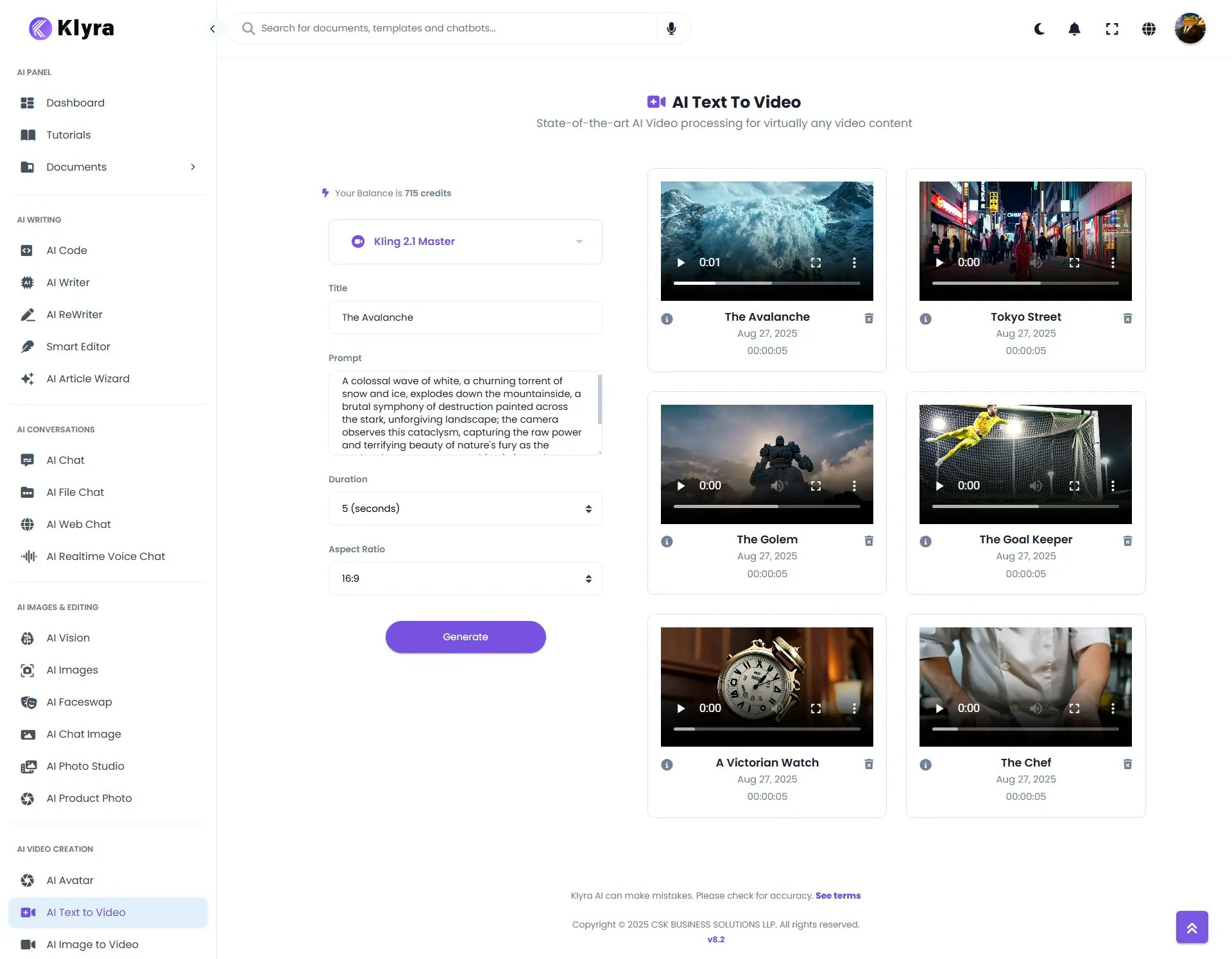
> 🔎 **Navigation:** Dashboard → Left Panel → AI Video Creation → AI Text to Video
* Go to the **AI Text to Video** tab.
* (Optional) Enter a **Video Title** to help organize your projects.
* Choose from available Text-to-Video models (**Veo3, Kling, Haiper, Luma, Mochi, MiniMax, Hunyuan**).
* Once selected, the **settings panel will update dynamically** to show options relevant to that model.
Depending on the selected model, provide:
* **Prompt** → Describe what the video should be about.
* **Duration** → Video length (options vary by model; not all models support custom duration).
* **Aspect Ratio** → Define the video’s shape (e.g., 16:9 for YouTube, 9:16 for TikTok, 1:1 for Instagram). Available ratios depend on the model.
* Click **Generate**.
* Wait a few minutes while AI processes your request.
* Your completed video will appear under the **Results section**, where you can **Play, Download, or Delete** it.
### 🎬 Example Walkthrough
Here’s an example of how to create a cinematic video using **AI Text to Video**.
**Model Selected:** Kling 2.1 Master\
**Title:** *The Avalanche*
**Prompt:**
> *“A colossal wave of white, a churning torrent of snow and ice, explodes down the mountainside, a brutal symphony of destruction painted across the stark, unforgiving landscape; the camera observes this cataclysm, capturing the raw power and terrifying beauty of nature's fury as the avalanche consumes everything in its path, leaving behind a trail of devastation and a silent, chilling testament to its might.”*
**Settings:**
* Duration: 5 seconds
* Aspect Ratio: 16:9
**Result:** A **cinematic short video** showing an avalanche crashing down a mountainside — visually dramatic, with dynamic motion capturing the destructive power of nature.
## 🎥 Showcase Examples
### 🎬 Example 1: The Awakening Golem
**Model Selected:** Kling 1.6 Pro
**Prompt:**
> *A towering stone golem, slowly awakening atop a misty mountain peak at dawn. Clouds swirl around its massive form. Low upward tilt shot, soft cool-toned light, epic and awe-inspiring atmosphere.*
**Settings:**
* Aspect Ratio: 16:9
* Duration: 5 seconds
**Result:** A cinematic video of a **giant stone golem emerging from slumber** at dawn. The camera tilts upward dramatically as **clouds swirl around its body**, illuminated by **soft blue morning light**. The scene conveys a sense of **epic scale, awe, and ancient mystery**.
### 🎬 Example 2: The Time Machine
**Model Selected:** Kling 1.6 Pro
**Prompt:**
> A Victorian-era pocket watch falls through multiple environments: Start in a wood-panelled study (duration: 1.5s, warm lighting), transition through a modern subway station (1s, fluorescent flicker effect), then a quantum realm with floating mathematical equations (1.5s, ethereal blue glow), finally landing in desert sand (1s). Camera maintains focus on the watch's face throughout, which should reflect each environment while its hands spin increasingly faster. End with the sand blast from impact revealing the watch is actually a sophisticated time machine.
**Settings:**
* Aspect Ratio: 16:9
* Duration: 5 seconds
**Result:** A **cinematic 5-second short** following a Victorian pocket watch as it tumbles through four rapidly changing environments.
### 💡 Tips
* **Choose the right model for your use case**:
* *Veo3* → cinematic storytelling.
* *Kling* → fast, realistic video generation.
* *Haiper* → creative short-form content.
* *MiniMax / Mochi* → experimental or stylized videos.
* *Luma Dream Machine* → high-fidelity, artistic results.
* *Hunyuan* → versatile use across multiple formats.
* **Write descriptive prompts** → Include style, mood, camera angle, and movement for better results.
* **Match aspect ratio to platform** → 16:9 (YouTube), 9:16 (TikTok/Reels), 1:1 (Instagram).
* **Keep length short** → Shorter prompts often yield higher-quality outputs.
* **Experiment with multiple models** → Each engine interprets prompts differently; test to find your preferred style.
***
### 📌 Example Use Cases
* **Marketers** → Create **ad campaigns** with cinematic video content generated from brand messages.
* **Content Creators** → Produce TikTok, Instagram Reels, or YouTube Shorts from text prompts.
* **Businesses** → Generate explainer videos for products or services.
* **Educators** → Create engaging visual learning content.
* **Game Developers** → Generate concept videos for worlds, characters, or environments.
* **Artists & Designers** → Experiment with visual storytelling using surreal or stylized AI outputs.
## How to Use
> 🔎 **Navigation:** Dashboard → Left Panel → AI Video Creation → AI Text to Video
* Go to the **AI Text to Video** tab.
* (Optional) Enter a **Video Title** to help organize your projects.
* Choose from available Text-to-Video models (**Veo3, Kling, Haiper, Luma, Mochi, MiniMax, Hunyuan**).
* Once selected, the **settings panel will update dynamically** to show options relevant to that model.
Depending on the selected model, provide:
* **Prompt** → Describe what the video should be about.
* **Duration** → Video length (options vary by model; not all models support custom duration).
* **Aspect Ratio** → Define the video’s shape (e.g., 16:9 for YouTube, 9:16 for TikTok, 1:1 for Instagram). Available ratios depend on the model.
* Click **Generate**.
* Wait a few minutes while AI processes your request.
* Your completed video will appear under the **Results section**, where you can **Play, Download, or Delete** it.
### 🎬 Example Walkthrough
Here’s an example of how to create a cinematic video using **AI Text to Video**.
**Model Selected:** Kling 2.1 Master\
**Title:** *The Avalanche*
**Prompt:**
> *“A colossal wave of white, a churning torrent of snow and ice, explodes down the mountainside, a brutal symphony of destruction painted across the stark, unforgiving landscape; the camera observes this cataclysm, capturing the raw power and terrifying beauty of nature's fury as the avalanche consumes everything in its path, leaving behind a trail of devastation and a silent, chilling testament to its might.”*
**Settings:**
* Duration: 5 seconds
* Aspect Ratio: 16:9
**Result:** A **cinematic short video** showing an avalanche crashing down a mountainside — visually dramatic, with dynamic motion capturing the destructive power of nature.
## 🎥 Showcase Examples
### 🎬 Example 1: The Awakening Golem
**Model Selected:** Kling 1.6 Pro
**Prompt:**
> *A towering stone golem, slowly awakening atop a misty mountain peak at dawn. Clouds swirl around its massive form. Low upward tilt shot, soft cool-toned light, epic and awe-inspiring atmosphere.*
**Settings:**
* Aspect Ratio: 16:9
* Duration: 5 seconds
**Result:** A cinematic video of a **giant stone golem emerging from slumber** at dawn. The camera tilts upward dramatically as **clouds swirl around its body**, illuminated by **soft blue morning light**. The scene conveys a sense of **epic scale, awe, and ancient mystery**.
### 🎬 Example 2: The Time Machine
**Model Selected:** Kling 1.6 Pro
**Prompt:**
> A Victorian-era pocket watch falls through multiple environments: Start in a wood-panelled study (duration: 1.5s, warm lighting), transition through a modern subway station (1s, fluorescent flicker effect), then a quantum realm with floating mathematical equations (1.5s, ethereal blue glow), finally landing in desert sand (1s). Camera maintains focus on the watch's face throughout, which should reflect each environment while its hands spin increasingly faster. End with the sand blast from impact revealing the watch is actually a sophisticated time machine.
**Settings:**
* Aspect Ratio: 16:9
* Duration: 5 seconds
**Result:** A **cinematic 5-second short** following a Victorian pocket watch as it tumbles through four rapidly changing environments.
### 💡 Tips
* **Choose the right model for your use case**:
* *Veo3* → cinematic storytelling.
* *Kling* → fast, realistic video generation.
* *Haiper* → creative short-form content.
* *MiniMax / Mochi* → experimental or stylized videos.
* *Luma Dream Machine* → high-fidelity, artistic results.
* *Hunyuan* → versatile use across multiple formats.
* **Write descriptive prompts** → Include style, mood, camera angle, and movement for better results.
* **Match aspect ratio to platform** → 16:9 (YouTube), 9:16 (TikTok/Reels), 1:1 (Instagram).
* **Keep length short** → Shorter prompts often yield higher-quality outputs.
* **Experiment with multiple models** → Each engine interprets prompts differently; test to find your preferred style.
***
### 📌 Example Use Cases
* **Marketers** → Create **ad campaigns** with cinematic video content generated from brand messages.
* **Content Creators** → Produce TikTok, Instagram Reels, or YouTube Shorts from text prompts.
* **Businesses** → Generate explainer videos for products or services.
* **Educators** → Create engaging visual learning content.
* **Game Developers** → Generate concept videos for worlds, characters, or environments.
* **Artists & Designers** → Experiment with visual storytelling using surreal or stylized AI outputs.