> ## Documentation Index
> Fetch the complete documentation index at: https://docs.klyra.ai/llms.txt
> Use this file to discover all available pages before exploring further.
# Ai seo
# AI SEO
AI SEO helps you research keywords, analyze existing content, and identify SEO opportunities from a single workspace.
Use it to:
* Analyze a webpage and identify SEO issues and opportunities
* Analyze written content for readability, SEO performance, keyword usage, and improvements
* Research a topic or keyword and discover related search opportunities
AI SEO is designed to help you make better SEO decisions. Always review recommendations and verify important information before publishing or making changes to your website.
## Before you begin
You need:
* A Klyra AI account
* A webpage URL, written content, or keyword/topic to analyze
* An SEO goal such as improving an existing page, planning an article, or finding new content opportunities
## Open AI SEO
1. Sign in to Klyra AI.
2. Open **AI SEO** from the **Content** section in the sidebar.
3. Choose one of the three workflows:
* **URL Analysis**
* **Text Analysis**
* **Keywords**
The three workflows use the same AI SEO workspace, so you can move from research to analysis without switching applications.
***
# 1. URL Analysis
URL Analysis evaluates a public webpage and presents an SEO overview of the page.
It is useful when you want to audit an existing page before improving or publishing it.
## Step 1: Open URL Analysis
Select **URL Analysis** at the top of AI SEO.
You will see a URL field with the placeholder:
`Enter URL to analyze (e.g. https://example.com)`
## Step 2: Enter a webpage URL
For the example in this tutorial, enter:
```text theme={null}
https://www.ibm.com/think/topics/artificial-intelligence
```
 ## Step 3: Analyze the URL
Click **Analyze URL**.
AI SEO processes the page and displays the analysis below the URL field.
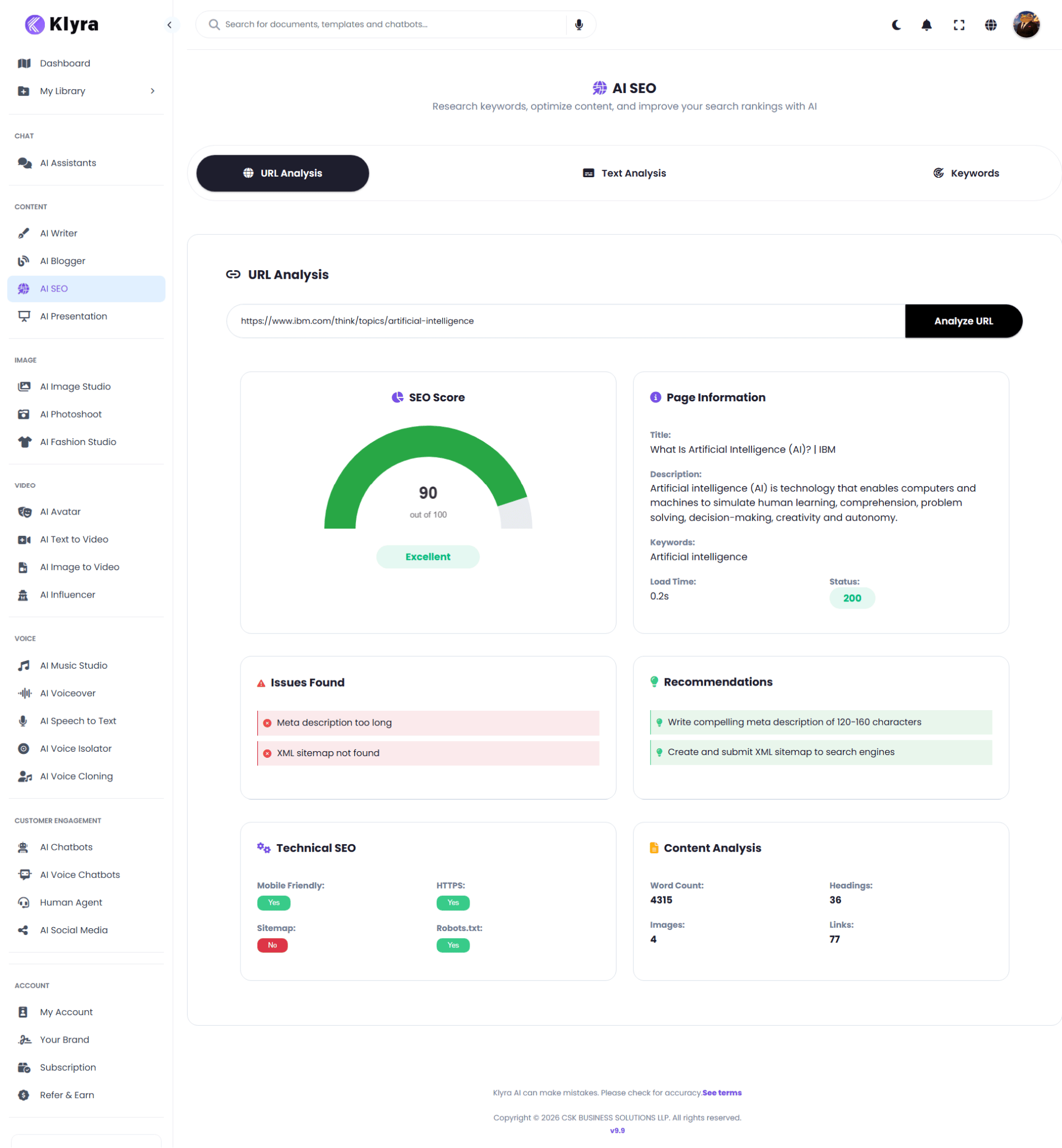
## Step 4: Review the SEO Score
The **SEO Score** provides an overall assessment.
In this example, the page receives:
* **90/100**
* **Excellent**
Use this score as a quick starting point. Review the individual sections before deciding what to change.
## Step 5: Review Page Information
The **Page Information** section shows key information detected from the webpage.
In the example, it includes:
* **Title:** What Is Artificial Intelligence (AI)? | IBM
* **Description:** Artificial intelligence (AI) is technology that enables computers and machines to simulate human learning, comprehension, problem solving, decision-making, creativity and autonomy.
* **Keywords:** Artificial intelligence
* **Load Time:** 0.2s
* **Status:** 200
This section helps you quickly confirm whether AI SEO successfully accessed the page and what core metadata it detected.
## Step 6: Review Issues Found
The **Issues Found** section highlights areas that may need attention.
For the example page, AI SEO identifies:
* Meta description too long
* XML sitemap not found
Use these findings as an actionable checklist for the page.
## Step 7: Review Recommendations
The **Recommendations** section translates detected issues into suggested actions.
For the example, AI SEO recommends:
* Write a compelling meta description of 120-160 characters
* Create and submit an XML sitemap to search engines
## Step 8: Review Technical SEO
The **Technical SEO** section provides a quick technical overview.
The example shows:
| Check | Result |
| --------------- | ------ |
| Mobile Friendly | Yes |
| HTTPS | Yes |
| Sitemap | No |
| Robots.txt | Yes |
## Step 9: Review Content Analysis
The **Content Analysis** section summarizes the page content.
The example shows:
* **Word Count:** 4315
* **Headings:** 36
* **Images:** 4
* **Links:** 77
This gives you a quick picture of the page's content depth and structure.
## What to do with URL Analysis results
A practical workflow is:
1. Check the overall SEO Score.
2. Review Page Information.
3. Fix the issues listed under Issues Found.
4. Apply useful Recommendations.
5. Review Technical SEO.
6. Check the content structure and depth.
7. Re-analyze the page after making significant changes.
***
# 2. Text Analysis
Text Analysis evaluates content directly inside AI SEO.
It can help you understand:
* Content statistics
* Readability
* SEO score
* Keyword usage
* Recommended SEO keywords
* SEO improvement opportunities
## Step 1: Open Text Analysis
Select **Text Analysis** at the top of AI SEO.
You will see a large text area with the placeholder:
`Enter your text content for analysis...`
## Step 2: Add your content
For this tutorial, use the following sample:
```text theme={null}
AI is changing the way businesses create content. Many companies are now using artificial intelligence to write blog posts, create social media content, generate images, and improve their marketing campaigns.
AI content tools can save businesses time and help teams produce more content. However, creating useful content still requires a clear strategy. Businesses need to understand their audience, choose the right topics, use relevant keywords, and make sure their content provides genuine value.
A good AI content strategy should focus on quality, consistency, search intent, and the needs of the reader. Companies that combine AI with human expertise can create better content and build a stronger online presence.
```
## Step 3: Analyze the content
Click **Analyze Text**.
AI SEO displays the analysis below the editor.
## Step 3: Analyze the URL
Click **Analyze URL**.
AI SEO processes the page and displays the analysis below the URL field.
## Step 4: Review the SEO Score
The **SEO Score** provides an overall assessment.
In this example, the page receives:
* **90/100**
* **Excellent**
Use this score as a quick starting point. Review the individual sections before deciding what to change.
## Step 5: Review Page Information
The **Page Information** section shows key information detected from the webpage.
In the example, it includes:
* **Title:** What Is Artificial Intelligence (AI)? | IBM
* **Description:** Artificial intelligence (AI) is technology that enables computers and machines to simulate human learning, comprehension, problem solving, decision-making, creativity and autonomy.
* **Keywords:** Artificial intelligence
* **Load Time:** 0.2s
* **Status:** 200
This section helps you quickly confirm whether AI SEO successfully accessed the page and what core metadata it detected.
## Step 6: Review Issues Found
The **Issues Found** section highlights areas that may need attention.
For the example page, AI SEO identifies:
* Meta description too long
* XML sitemap not found
Use these findings as an actionable checklist for the page.
## Step 7: Review Recommendations
The **Recommendations** section translates detected issues into suggested actions.
For the example, AI SEO recommends:
* Write a compelling meta description of 120-160 characters
* Create and submit an XML sitemap to search engines
## Step 8: Review Technical SEO
The **Technical SEO** section provides a quick technical overview.
The example shows:
| Check | Result |
| --------------- | ------ |
| Mobile Friendly | Yes |
| HTTPS | Yes |
| Sitemap | No |
| Robots.txt | Yes |
## Step 9: Review Content Analysis
The **Content Analysis** section summarizes the page content.
The example shows:
* **Word Count:** 4315
* **Headings:** 36
* **Images:** 4
* **Links:** 77
This gives you a quick picture of the page's content depth and structure.
## What to do with URL Analysis results
A practical workflow is:
1. Check the overall SEO Score.
2. Review Page Information.
3. Fix the issues listed under Issues Found.
4. Apply useful Recommendations.
5. Review Technical SEO.
6. Check the content structure and depth.
7. Re-analyze the page after making significant changes.
***
# 2. Text Analysis
Text Analysis evaluates content directly inside AI SEO.
It can help you understand:
* Content statistics
* Readability
* SEO score
* Keyword usage
* Recommended SEO keywords
* SEO improvement opportunities
## Step 1: Open Text Analysis
Select **Text Analysis** at the top of AI SEO.
You will see a large text area with the placeholder:
`Enter your text content for analysis...`
## Step 2: Add your content
For this tutorial, use the following sample:
```text theme={null}
AI is changing the way businesses create content. Many companies are now using artificial intelligence to write blog posts, create social media content, generate images, and improve their marketing campaigns.
AI content tools can save businesses time and help teams produce more content. However, creating useful content still requires a clear strategy. Businesses need to understand their audience, choose the right topics, use relevant keywords, and make sure their content provides genuine value.
A good AI content strategy should focus on quality, consistency, search intent, and the needs of the reader. Companies that combine AI with human expertise can create better content and build a stronger online presence.
```
## Step 3: Analyze the content
Click **Analyze Text**.
AI SEO displays the analysis below the editor.
 ## Step 4: Review Content Stats
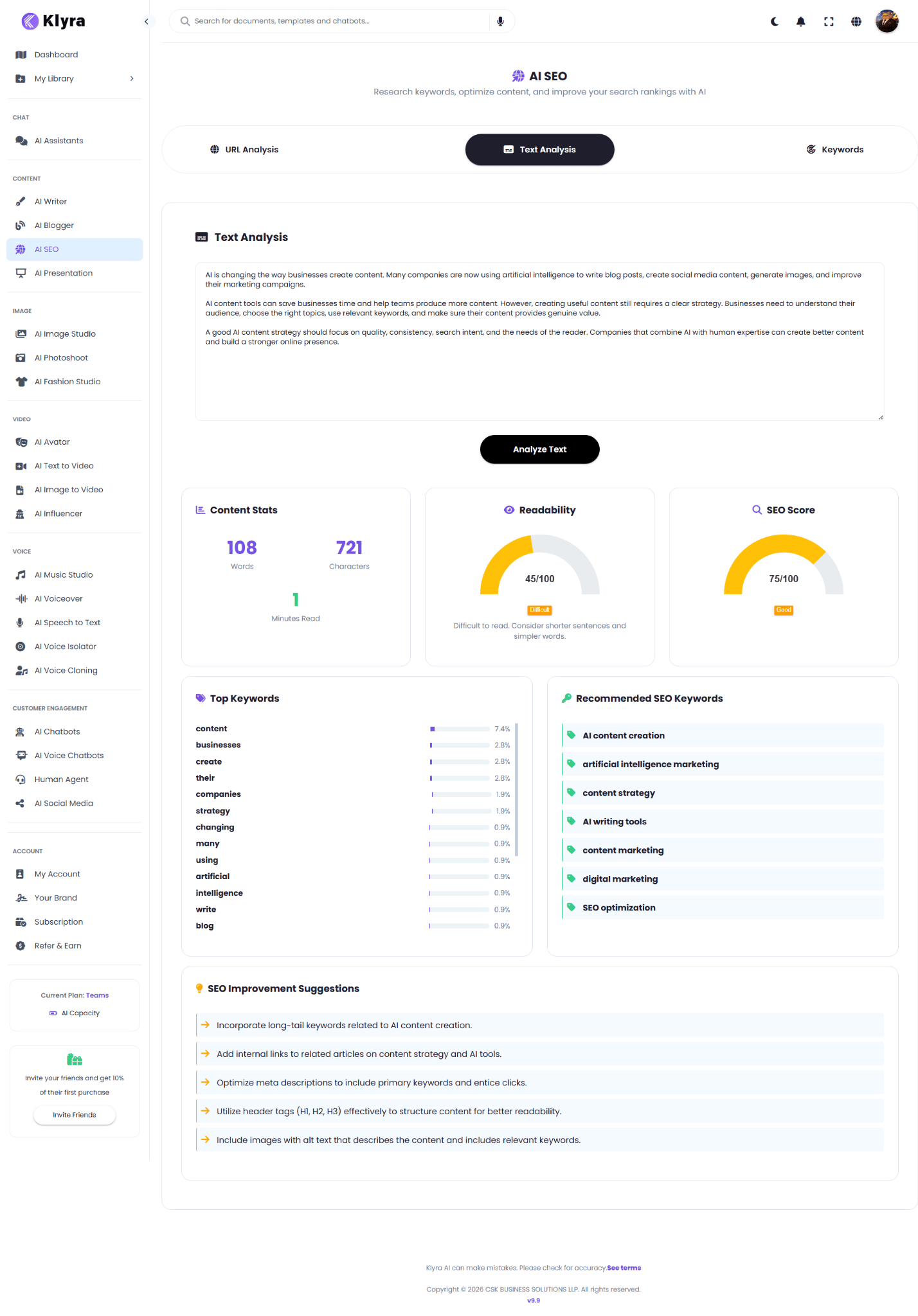
The **Content Stats** card shows:
* **108 Words**
* **721 Characters**
* **1 Minute Read**
These statistics help you understand the current size of the content.
## Step 5: Review Readability
The **Readability** card shows:
* **45/100**
* **Difficult**
AI SEO also provides an improvement hint:
`Difficult to read. Consider shorter sentences and simpler words.`
Use this section to identify content that may need clearer wording or shorter sentence structures.
## Step 6: Review the SEO Score
The **SEO Score** card shows:
* **75/100**
* **Good**
The score gives you a quick indication of the content's current SEO quality.
Do not treat the score as the only measure of content quality. Review the keywords and recommendations alongside it.
## Step 7: Review Top Keywords
The **Top Keywords** section shows the words appearing most frequently in the analyzed content.
For the example, some of the leading terms include:
* content
* businesses
* create
* their
* companies
* strategy
* changing
* many
* using
* artificial
* intelligence
* write
* blog
The percentage beside each keyword indicates its observed frequency in the analyzed content.
## Step 8: Review Recommended SEO Keywords
AI SEO also suggests related keywords that may strengthen the content.
The example recommends:
* AI content creation
* artificial intelligence marketing
* content strategy
* AI writing tools
* content marketing
* digital marketing
* SEO optimization
Use these recommendations naturally where they genuinely fit the topic. Avoid adding keywords simply to increase keyword frequency.
## Step 9: Review SEO Improvement Suggestions
The **SEO Improvement Suggestions** section provides actionable recommendations.
For this example, AI SEO suggests:
1. Incorporate long-tail keywords related to AI content creation.
2. Add internal links to related articles on content strategy and AI tools.
3. Optimize meta descriptions to include primary keywords and entice clicks.
4. Utilize header tags such as H1, H2, and H3 to structure content for better readability.
5. Include images with alt text that describes the content and includes relevant keywords.
## What to do with Text Analysis results
Use the results as an editing checklist:
1. Check content length.
2. Improve readability where necessary.
3. Review the SEO Score.
4. Look at frequently used keywords.
5. Compare them with Recommended SEO Keywords.
6. Apply relevant SEO Improvement Suggestions.
7. Re-analyze the revised content.
***
# 3. Keyword Research
Keyword Research helps you explore a topic before creating content.
Use it when you want to understand:
* Search demand
* Keyword difficulty
* Commercial value
* Competition
* Related keyword opportunities
* Search trends
## Step 1: Open Keywords
Select **Keywords** at the top of AI SEO.
You will see a search field with the placeholder:
`Enter a keyword or topic`
## Step 2: Enter a keyword or topic
For this tutorial, enter:
```text theme={null}
AI tools for business
```
## Step 4: Review Content Stats
The **Content Stats** card shows:
* **108 Words**
* **721 Characters**
* **1 Minute Read**
These statistics help you understand the current size of the content.
## Step 5: Review Readability
The **Readability** card shows:
* **45/100**
* **Difficult**
AI SEO also provides an improvement hint:
`Difficult to read. Consider shorter sentences and simpler words.`
Use this section to identify content that may need clearer wording or shorter sentence structures.
## Step 6: Review the SEO Score
The **SEO Score** card shows:
* **75/100**
* **Good**
The score gives you a quick indication of the content's current SEO quality.
Do not treat the score as the only measure of content quality. Review the keywords and recommendations alongside it.
## Step 7: Review Top Keywords
The **Top Keywords** section shows the words appearing most frequently in the analyzed content.
For the example, some of the leading terms include:
* content
* businesses
* create
* their
* companies
* strategy
* changing
* many
* using
* artificial
* intelligence
* write
* blog
The percentage beside each keyword indicates its observed frequency in the analyzed content.
## Step 8: Review Recommended SEO Keywords
AI SEO also suggests related keywords that may strengthen the content.
The example recommends:
* AI content creation
* artificial intelligence marketing
* content strategy
* AI writing tools
* content marketing
* digital marketing
* SEO optimization
Use these recommendations naturally where they genuinely fit the topic. Avoid adding keywords simply to increase keyword frequency.
## Step 9: Review SEO Improvement Suggestions
The **SEO Improvement Suggestions** section provides actionable recommendations.
For this example, AI SEO suggests:
1. Incorporate long-tail keywords related to AI content creation.
2. Add internal links to related articles on content strategy and AI tools.
3. Optimize meta descriptions to include primary keywords and entice clicks.
4. Utilize header tags such as H1, H2, and H3 to structure content for better readability.
5. Include images with alt text that describes the content and includes relevant keywords.
## What to do with Text Analysis results
Use the results as an editing checklist:
1. Check content length.
2. Improve readability where necessary.
3. Review the SEO Score.
4. Look at frequently used keywords.
5. Compare them with Recommended SEO Keywords.
6. Apply relevant SEO Improvement Suggestions.
7. Re-analyze the revised content.
***
# 3. Keyword Research
Keyword Research helps you explore a topic before creating content.
Use it when you want to understand:
* Search demand
* Keyword difficulty
* Commercial value
* Competition
* Related keyword opportunities
* Search trends
## Step 1: Open Keywords
Select **Keywords** at the top of AI SEO.
You will see a search field with the placeholder:
`Enter a keyword or topic`
## Step 2: Enter a keyword or topic
For this tutorial, enter:
```text theme={null}
AI tools for business
```
 ## Step 3: Start the research
Click **Research**.
AI SEO displays an overview and keyword analysis.
## Step 4: Review Keyword Overview
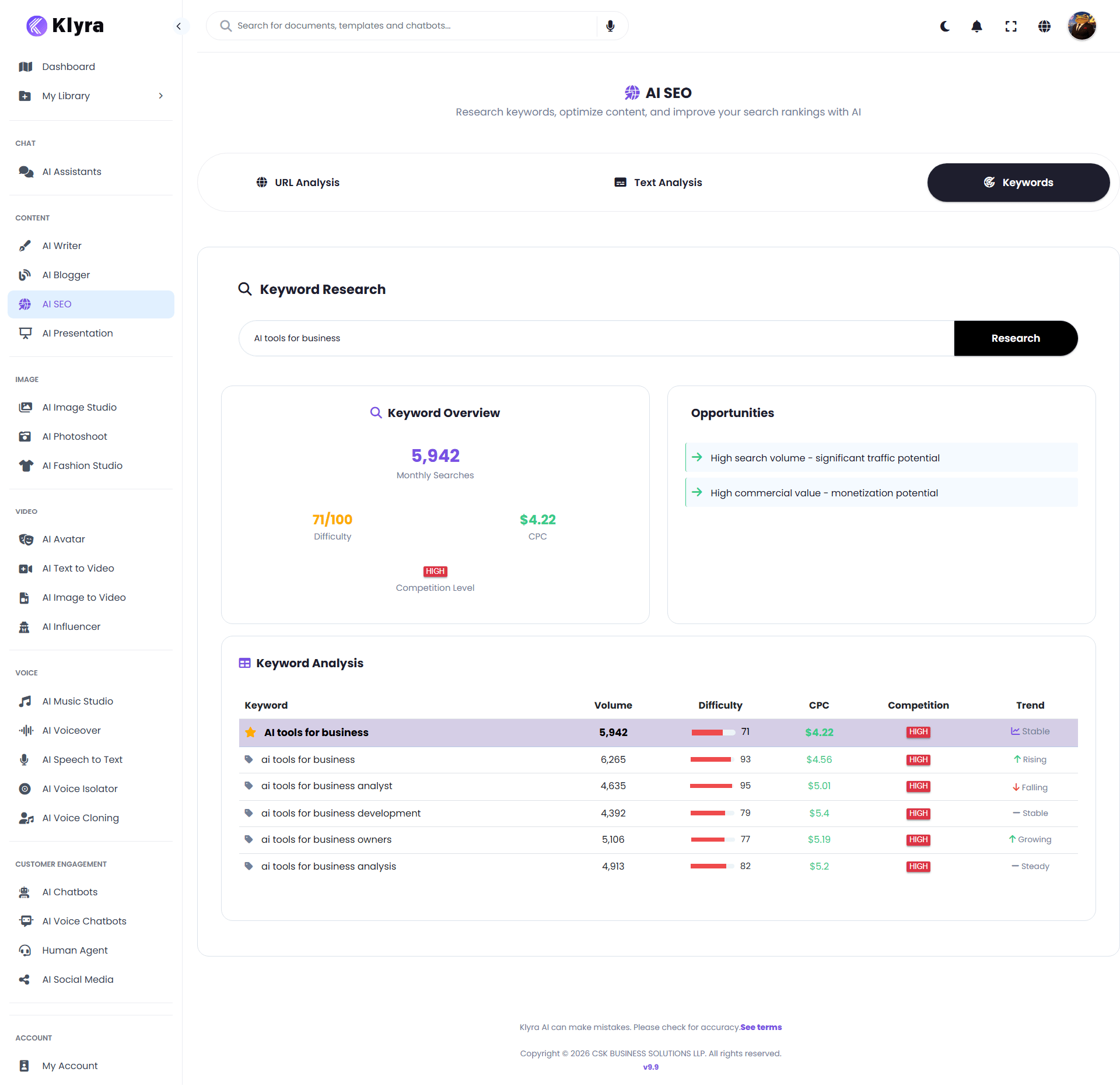
The **Keyword Overview** section provides a summary of the main keyword.
For this example:
* **Monthly Searches:** 5,942
* **Difficulty:** 71/100
* **CPC:** \$4.22
* **Competition Level:** High
These metrics help you evaluate the potential and competitiveness of the topic.
## Step 5: Review Opportunities
The **Opportunities** section highlights potential value.
For the example, AI SEO identifies:
* High search volume, indicating significant traffic potential
* High commercial value, indicating monetization potential
This can help you decide whether a topic deserves further content research.
## Step 6: Review Keyword Analysis
The **Keyword Analysis** table provides related keyword opportunities.
For the example, the table includes:
| Keyword | Volume | Difficulty | CPC | Competition | Trend |
| --------------------------------- | -----: | ---------: | -----: | ----------- | ------- |
| AI tools for business | 5,942 | 71 | \$4.22 | High | Stable |
| ai tools for business | 6,265 | 93 | \$4.56 | High | Rising |
| ai tools for business analyst | 4,635 | 95 | \$5.01 | High | Falling |
| ai tools for business development | 4,392 | 79 | \$5.40 | High | Stable |
| ai tools for business owners | 5,106 | 77 | \$5.19 | High | Growing |
| ai tools for business analysis | 4,913 | 82 | \$5.20 | High | Steady |
Use these related terms to understand the broader search landscape around your topic.
## How to choose a keyword
Do not automatically choose the keyword with the highest search volume.
Instead, consider the combination of:
* Search volume
* Difficulty
* Commercial value
* Competition
* Trend
* Relevance to your audience
* Your ability to create genuinely useful content
A highly relevant keyword with realistic ranking potential can be more valuable than a larger but extremely competitive keyword.
***
# A practical AI SEO workflow
The three AI SEO workflows work especially well together.
### Step 1: Research the topic
Start with **Keywords**.
Example:
```text theme={null}
AI tools for business
```
Review the keyword overview and related keyword opportunities.
### Step 2: Create your content
Use your chosen topic and keywords to create an article or other content.
You can then move the draft into **Text Analysis**.
### Step 3: Analyze the content
Run **Text Analysis** to review:
* Content Stats
* Readability
* SEO Score
* Top Keywords
* Recommended SEO Keywords
* SEO Improvement Suggestions
### Step 4: Improve the content
Apply the relevant recommendations and edit the content.
Focus on usefulness, clarity, search intent, and natural keyword usage.
### Step 5: Analyze the published page
Once the content is published, use **URL Analysis** to evaluate the live webpage.
Review:
* SEO Score
* Page Information
* Issues Found
* Recommendations
* Technical SEO
* Content Analysis
### The complete workflow
**Keyword Research**
↓
**Create Content**
↓
**Text Analysis**
↓
**Improve Content**
↓
**Publish**
↓
**URL Analysis**
↓
**Identify Further Improvements**
This creates a simple research-to-publishing-to-optimization workflow inside Klyra AI.
***
# Tips for better results
Start with a clear topic or keyword rather than a very broad concept. Specific topics make keyword research and content planning more actionable.
Choose keywords and content topics based on what the reader is actually trying to accomplish. Do not optimize for a keyword simply because it has high search volume.
AI SEO recommendations are suggestions, not requirements. Apply recommendations that improve the usefulness and clarity of your content.
Add relevant keywords naturally. Content should remain useful and readable for people first.
After improving your content or webpage, run the analysis again to see whether the results have changed.
A strong content score does not replace technical SEO checks. Review issues such as metadata, sitemap availability, HTTPS, mobile friendliness, and robots.txt separately.
***
# Frequently Asked Questions
AI SEO provides three workflows: URL Analysis, Text Analysis, and Keyword Research. Together they help you research topics, evaluate content, and identify SEO improvements.
URL Analysis evaluates a webpage and presents an SEO Score, page information, detected issues, recommendations, technical SEO checks, and content statistics.
Text Analysis evaluates content you provide directly. It reports content statistics, readability, SEO Score, keyword usage, recommended SEO keywords, and SEO improvement suggestions.
Keyword Research analyzes a keyword or topic and provides search volume, difficulty, CPC, competition, trend information, opportunities, and related keywords.
No. Select keywords that are relevant to the topic and useful to your audience. Natural usage is more important than forcing every recommendation into the content.
No. Use the score as a quick indicator, then review the underlying issues, recommendations, readability, keywords, and technical findings.
***
# Summary
AI SEO brings three important SEO workflows into one workspace:
* **URL Analysis** helps you audit existing webpages.
* **Text Analysis** helps you evaluate and improve content before publishing.
* **Keyword Research** helps you discover search opportunities before creating content.
A strong workflow is to **research the topic, create the content, analyze and improve it, publish it, and then audit the live page**.
AI SEO should support your SEO strategy, not replace human judgment. Review recommendations for relevance, accuracy, search intent, and your specific business context before making changes.
## Step 3: Start the research
Click **Research**.
AI SEO displays an overview and keyword analysis.
## Step 4: Review Keyword Overview
The **Keyword Overview** section provides a summary of the main keyword.
For this example:
* **Monthly Searches:** 5,942
* **Difficulty:** 71/100
* **CPC:** \$4.22
* **Competition Level:** High
These metrics help you evaluate the potential and competitiveness of the topic.
## Step 5: Review Opportunities
The **Opportunities** section highlights potential value.
For the example, AI SEO identifies:
* High search volume, indicating significant traffic potential
* High commercial value, indicating monetization potential
This can help you decide whether a topic deserves further content research.
## Step 6: Review Keyword Analysis
The **Keyword Analysis** table provides related keyword opportunities.
For the example, the table includes:
| Keyword | Volume | Difficulty | CPC | Competition | Trend |
| --------------------------------- | -----: | ---------: | -----: | ----------- | ------- |
| AI tools for business | 5,942 | 71 | \$4.22 | High | Stable |
| ai tools for business | 6,265 | 93 | \$4.56 | High | Rising |
| ai tools for business analyst | 4,635 | 95 | \$5.01 | High | Falling |
| ai tools for business development | 4,392 | 79 | \$5.40 | High | Stable |
| ai tools for business owners | 5,106 | 77 | \$5.19 | High | Growing |
| ai tools for business analysis | 4,913 | 82 | \$5.20 | High | Steady |
Use these related terms to understand the broader search landscape around your topic.
## How to choose a keyword
Do not automatically choose the keyword with the highest search volume.
Instead, consider the combination of:
* Search volume
* Difficulty
* Commercial value
* Competition
* Trend
* Relevance to your audience
* Your ability to create genuinely useful content
A highly relevant keyword with realistic ranking potential can be more valuable than a larger but extremely competitive keyword.
***
# A practical AI SEO workflow
The three AI SEO workflows work especially well together.
### Step 1: Research the topic
Start with **Keywords**.
Example:
```text theme={null}
AI tools for business
```
Review the keyword overview and related keyword opportunities.
### Step 2: Create your content
Use your chosen topic and keywords to create an article or other content.
You can then move the draft into **Text Analysis**.
### Step 3: Analyze the content
Run **Text Analysis** to review:
* Content Stats
* Readability
* SEO Score
* Top Keywords
* Recommended SEO Keywords
* SEO Improvement Suggestions
### Step 4: Improve the content
Apply the relevant recommendations and edit the content.
Focus on usefulness, clarity, search intent, and natural keyword usage.
### Step 5: Analyze the published page
Once the content is published, use **URL Analysis** to evaluate the live webpage.
Review:
* SEO Score
* Page Information
* Issues Found
* Recommendations
* Technical SEO
* Content Analysis
### The complete workflow
**Keyword Research**
↓
**Create Content**
↓
**Text Analysis**
↓
**Improve Content**
↓
**Publish**
↓
**URL Analysis**
↓
**Identify Further Improvements**
This creates a simple research-to-publishing-to-optimization workflow inside Klyra AI.
***
# Tips for better results
Start with a clear topic or keyword rather than a very broad concept. Specific topics make keyword research and content planning more actionable.
Choose keywords and content topics based on what the reader is actually trying to accomplish. Do not optimize for a keyword simply because it has high search volume.
AI SEO recommendations are suggestions, not requirements. Apply recommendations that improve the usefulness and clarity of your content.
Add relevant keywords naturally. Content should remain useful and readable for people first.
After improving your content or webpage, run the analysis again to see whether the results have changed.
A strong content score does not replace technical SEO checks. Review issues such as metadata, sitemap availability, HTTPS, mobile friendliness, and robots.txt separately.
***
# Frequently Asked Questions
AI SEO provides three workflows: URL Analysis, Text Analysis, and Keyword Research. Together they help you research topics, evaluate content, and identify SEO improvements.
URL Analysis evaluates a webpage and presents an SEO Score, page information, detected issues, recommendations, technical SEO checks, and content statistics.
Text Analysis evaluates content you provide directly. It reports content statistics, readability, SEO Score, keyword usage, recommended SEO keywords, and SEO improvement suggestions.
Keyword Research analyzes a keyword or topic and provides search volume, difficulty, CPC, competition, trend information, opportunities, and related keywords.
No. Select keywords that are relevant to the topic and useful to your audience. Natural usage is more important than forcing every recommendation into the content.
No. Use the score as a quick indicator, then review the underlying issues, recommendations, readability, keywords, and technical findings.
***
# Summary
AI SEO brings three important SEO workflows into one workspace:
* **URL Analysis** helps you audit existing webpages.
* **Text Analysis** helps you evaluate and improve content before publishing.
* **Keyword Research** helps you discover search opportunities before creating content.
A strong workflow is to **research the topic, create the content, analyze and improve it, publish it, and then audit the live page**.
AI SEO should support your SEO strategy, not replace human judgment. Review recommendations for relevance, accuracy, search intent, and your specific business context before making changes.