> ## Documentation Index
> Fetch the complete documentation index at: https://docs.klyra.ai/llms.txt
> Use this file to discover all available pages before exploring further.
# AI Product Photos
> Transform ordinary product shots into studio-quality images with customizable backgrounds, automated enhancements, and seamless editing — ideal for e-commerce and marketing.
## Introduction
The [**AI Product Photography**](https://klyra.ai/page/ai-product-photos) tool in Klyra AI is built to **elevate your online store’s product visuals**. Instead of relying on expensive photo studios or complex editing software, you can instantly create professional, polished product photos with just a few clicks.
This feature ensures **consistency across your product catalog**, helping you establish a reliable brand identity. By automating background creation, cleanup, and quality enhancements, it saves both **time and resources**, so you can focus on scaling your business instead of wrestling with image editing.
With AI Product Photography, you can:
* Generate clean marketplace-ready photos.
* Replace or enhance backgrounds to match brand aesthetics.
* Improve resolution and quality for sharper product visuals.
* Expand product photos with **outpainting** for creative layouts.
This feature is available only with a paid subscription plan.
## How to Use AI Product Photography
> 🔎 **Navigation:** Dashboard → Left Panel → AI Images & Editing → AI Product Photo
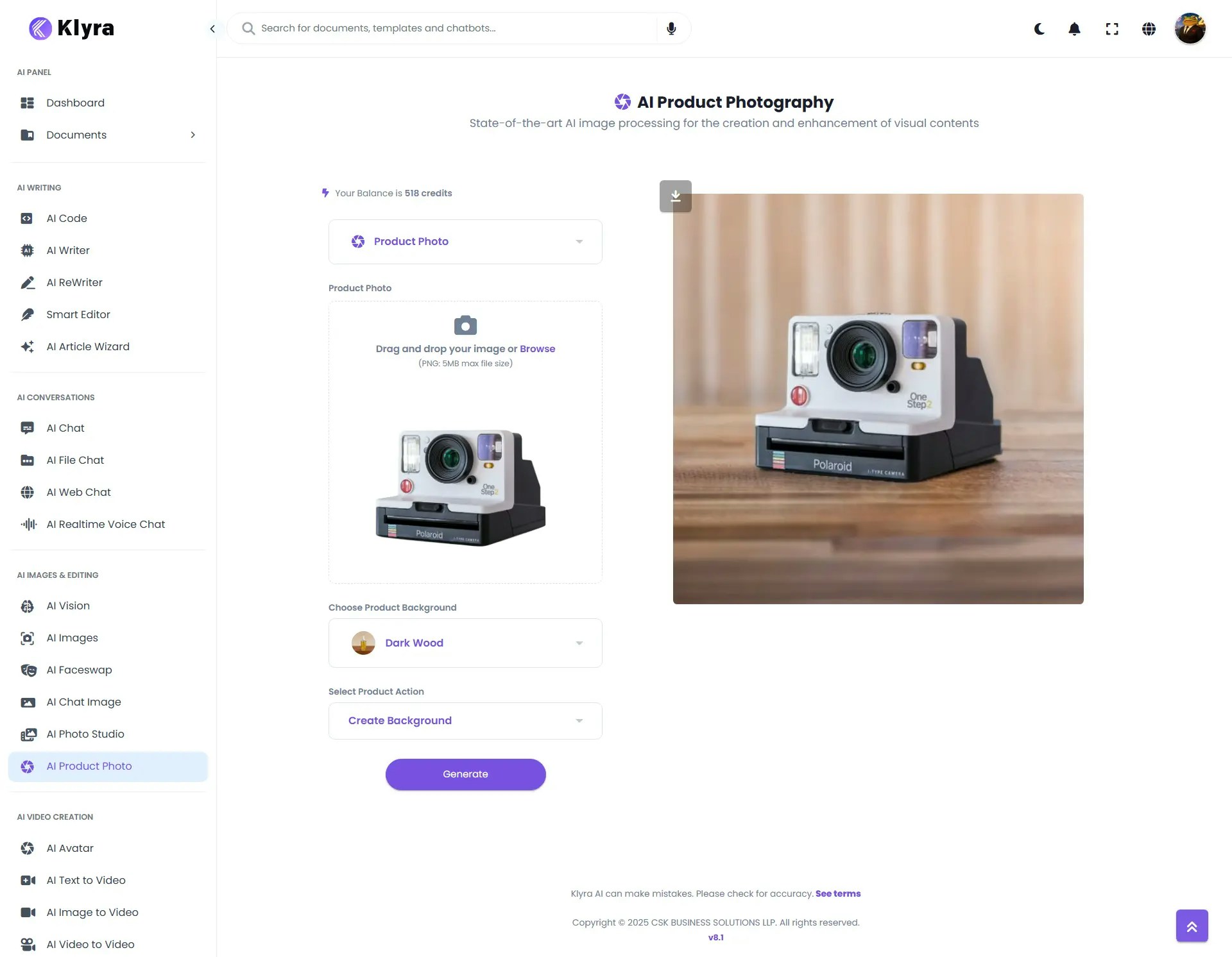
This opens the **AI Product Photography** workspace in the main area.
* Use the **Drag & Drop** feature to quickly add your product photo,\
**or** click **Browse** to select a file from your computer.
* The tool supports standard formats (JPEG, PNG, etc.).
Upload high-quality images with clear product visibility for the best results.
* Select from a library of **professional backgrounds** designed for product displays.
* Options range from **clean white or transparent backgrounds** (ideal for marketplaces like Amazon or eBay) to **lifestyle-inspired backdrops** (for marketing campaigns and ads).
* Pick the style that complements your product’s purpose and audience.
Choose from powerful AI-driven editing actions to refine your product photo:
* **Create Background** → Automatically generate a realistic background around your product.
* **Remove Background** → Strip away distractions, leaving your product isolated on a plain or transparent background.
Each option is designed to **minimize manual editing** while maximizing the **professional look** of your product.
* After selecting your options, click **Generate**.
* The processed product image will appear on the **right side of the main area** for you to preview.
* From there, you can download and use the image in your store, ads, or campaigns.
 ### 💡 Tips
* **Use high-resolution photos** → Start with the clearest image possible for sharper AI outputs.
* **Good lighting** → Natural or soft white light ensures fewer shadows and more realistic results.
* **Neutral background** → Upload products photographed against plain or uncluttered surfaces to help the AI isolate them easily.
* **Centered product** → Place the product in the middle of the image for more balanced background creation.
* **Minimal reflections & glare** → Especially important for shiny items (e.g., electronics, glassware, jewelry).
### 📌 Example Use Cases
* **E-commerce product listings:** Generate clean white-background images for marketplaces (Amazon, Shopify, WooCommerce).
* **Branding consistency:** Apply the same background style across your entire product line to create a unified brand look.
* **Marketing visuals:** Design eye-catching promotional product shots with seasonal or thematic backgrounds (holidays, sales, events).
* **Social media advertising:** Quickly create scroll-stopping product posts for Instagram, TikTok, Facebook, and LinkedIn.
* **Startups and small businesses:** Reduce costs of professional studios and photoshoots by producing high-quality images in-house.
* **Catalogs and print materials:** Use the **Upscale Photo** option to generate sharp, print-ready product visuals.
### 💡 Tips
* **Use high-resolution photos** → Start with the clearest image possible for sharper AI outputs.
* **Good lighting** → Natural or soft white light ensures fewer shadows and more realistic results.
* **Neutral background** → Upload products photographed against plain or uncluttered surfaces to help the AI isolate them easily.
* **Centered product** → Place the product in the middle of the image for more balanced background creation.
* **Minimal reflections & glare** → Especially important for shiny items (e.g., electronics, glassware, jewelry).
### 📌 Example Use Cases
* **E-commerce product listings:** Generate clean white-background images for marketplaces (Amazon, Shopify, WooCommerce).
* **Branding consistency:** Apply the same background style across your entire product line to create a unified brand look.
* **Marketing visuals:** Design eye-catching promotional product shots with seasonal or thematic backgrounds (holidays, sales, events).
* **Social media advertising:** Quickly create scroll-stopping product posts for Instagram, TikTok, Facebook, and LinkedIn.
* **Startups and small businesses:** Reduce costs of professional studios and photoshoots by producing high-quality images in-house.
* **Catalogs and print materials:** Use the **Upscale Photo** option to generate sharp, print-ready product visuals.