> ## Documentation Index
> Fetch the complete documentation index at: https://docs.klyra.ai/llms.txt
> Use this file to discover all available pages before exploring further.
# AI Images
> Create and enhance images with Midjourney, DALL·E, Clipdrop, Flux, and Stable Diffusion inside Klyra AI. Produce professional visuals for web design, advertising, e-commerce, and social media with full control over model, resolution, style, lighting, medium, mood, and more.
## Introduction
The [**AI Image Generator**](https://klyra.ai/page/ai-image-generator) in Klyra AI transforms your creative ideas into professional-quality visuals. Whether you’re building a campaign banner, an e-commerce listing photo, or concept art, you can fine-tune results with advanced options like **style, mood, lighting, artist presets, and aspect ratios**.
Different AI models bring unique strengths:
* **Midjourney** → Artistic and cinematic creativity.
* **Nano Banana** → Fast, playful, and social-media-ready visuals
* **DALL·E** → Clean, concept-driven visuals (great for products).
* **Stable Diffusion** → Flexible customization with aspect ratios and styles.
* **Flux** → Fast results with square/portrait/landscape presets.
* **Clipdrop** → Object-focused edits and background handling for e-commerce.
## How to Use
> 🔎 **Navigation:** Dashboard → Left Panel → AI Images & Editing → AI Images
This opens the AI Image Generator workspace.
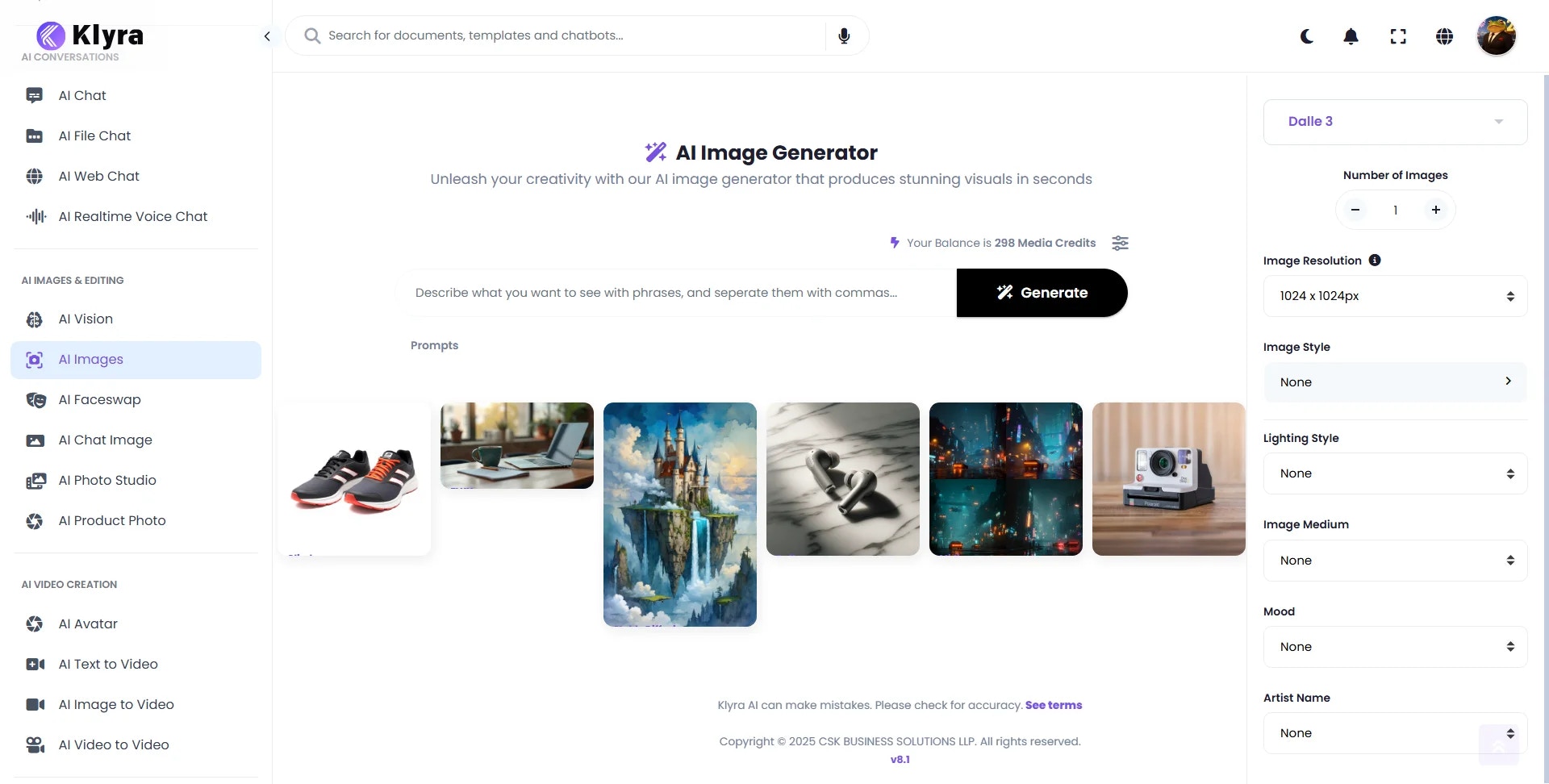 The right panel allows you to set generation preferences:
* **Image Model:** Choose from **Midjourney, DALL·E, Clipdrop, Flux, Stable Diffusion**.
* **Number of Images:** Adjust with **±** (default: 1).
* **Resolution / Aspect Ratio:** Options depend on the model.
* **Style, Lighting, Medium, Mood, Artist Name:** Fine-tune for creative direction.
Controls vary by model (e.g., DALL·E = fixed 1024×1024, Flux = quick presets, Stable Diffusion = custom aspect ratios).
Describe your desired image in detail, then click **Generate**.
* Include subject, environment, style, lighting, and mood for best results.
* Example: **“A pair of running shoes isolated on a pure white background, ecommerce-ready, high contrast.”**
The right panel allows you to set generation preferences:
* **Image Model:** Choose from **Midjourney, DALL·E, Clipdrop, Flux, Stable Diffusion**.
* **Number of Images:** Adjust with **±** (default: 1).
* **Resolution / Aspect Ratio:** Options depend on the model.
* **Style, Lighting, Medium, Mood, Artist Name:** Fine-tune for creative direction.
Controls vary by model (e.g., DALL·E = fixed 1024×1024, Flux = quick presets, Stable Diffusion = custom aspect ratios).
Describe your desired image in detail, then click **Generate**.
* Include subject, environment, style, lighting, and mood for best results.
* Example: **“A pair of running shoes isolated on a pure white background, ecommerce-ready, high contrast.”**
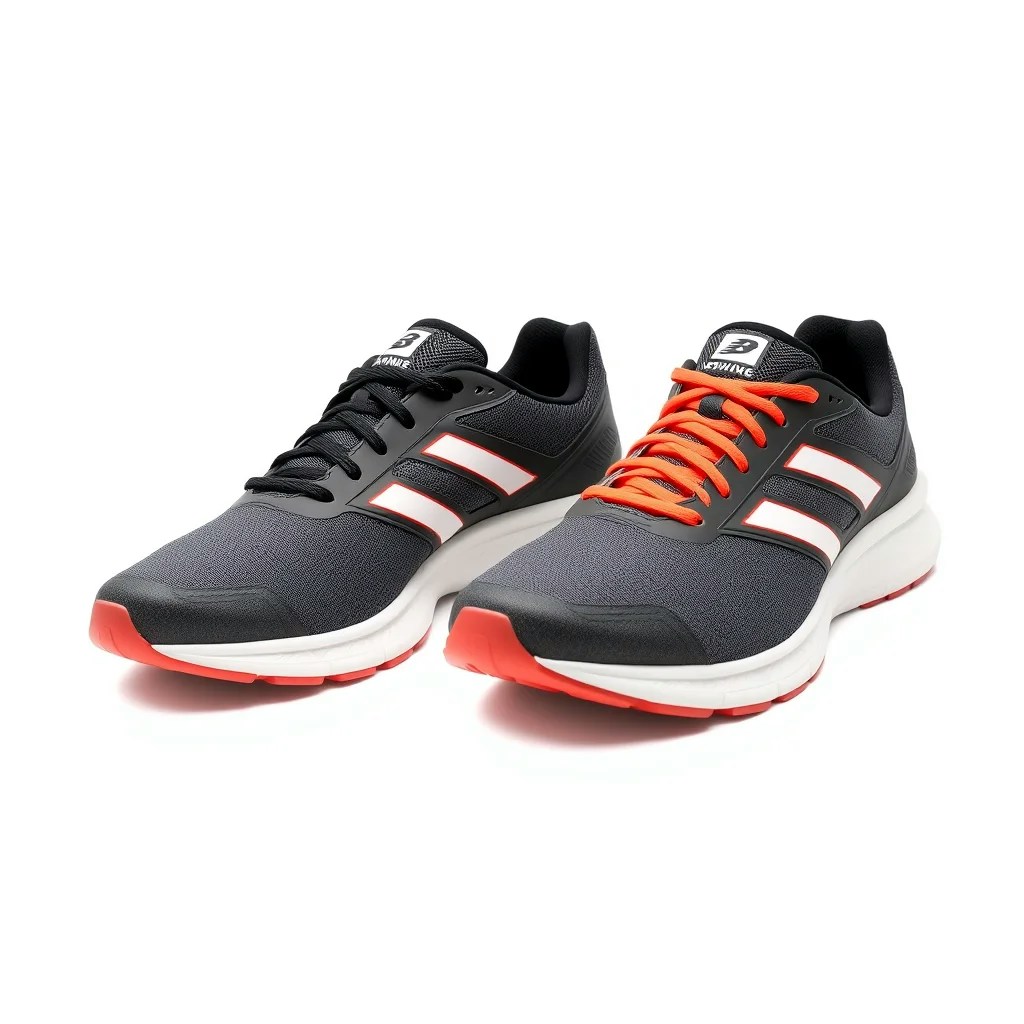 * Generated images appear **below the prompt area**.
* Click **View** to inspect all settings used for that image.
* **Download immediately** or access later under\
**AI Panel → Documents → All Images**.
## 🌟 Model Examples & Test Prompts
Here are tested prompts and settings you can try to explore the strengths of each model:
### 🔹 Midjourney – Cinematic & Artistic
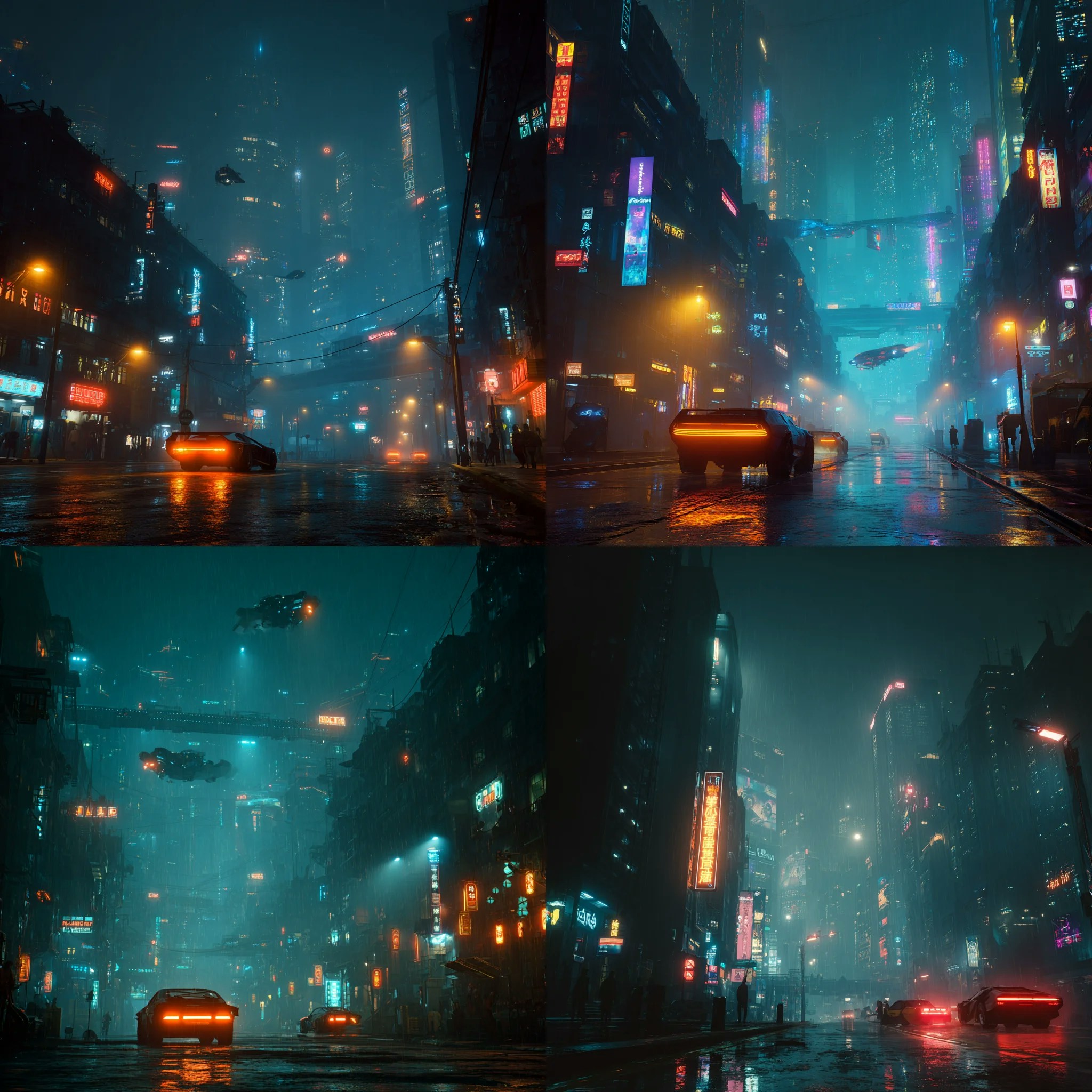
**Prompt:** *“A futuristic city skyline at night, glowing neon lights, cyberpunk aesthetic, flying cars, rain-soaked streets, cinematic wide shot.”*\
**Parameters:** Style = Cinematic, Lighting = Dramatic, Medium = Digital Art, Mood = Dark/Colorful
👉 **Best for:** Concept art, cinematic visuals, and imaginative worlds.
**Note on Midjourney Outputs**\
Unlike other models, Midjourney generates a **grid of 4 sub-images (variants)** inside a single image file:
* If you select **1 image**, you’ll receive **1 grid containing 4 variants**.
* If you select **2 images**, you’ll receive **2 grids containing a total of 8 variants**.
* Each grid has a **higher resolution** since it combines the resolution of all 4 sub-images.
This makes Midjourney especially useful for **creative exploration**, as you get multiple variations of your prompt in a single generation.
* Generated images appear **below the prompt area**.
* Click **View** to inspect all settings used for that image.
* **Download immediately** or access later under\
**AI Panel → Documents → All Images**.
## 🌟 Model Examples & Test Prompts
Here are tested prompts and settings you can try to explore the strengths of each model:
### 🔹 Midjourney – Cinematic & Artistic
**Prompt:** *“A futuristic city skyline at night, glowing neon lights, cyberpunk aesthetic, flying cars, rain-soaked streets, cinematic wide shot.”*\
**Parameters:** Style = Cinematic, Lighting = Dramatic, Medium = Digital Art, Mood = Dark/Colorful
👉 **Best for:** Concept art, cinematic visuals, and imaginative worlds.
**Note on Midjourney Outputs**\
Unlike other models, Midjourney generates a **grid of 4 sub-images (variants)** inside a single image file:
* If you select **1 image**, you’ll receive **1 grid containing 4 variants**.
* If you select **2 images**, you’ll receive **2 grids containing a total of 8 variants**.
* Each grid has a **higher resolution** since it combines the resolution of all 4 sub-images.
This makes Midjourney especially useful for **creative exploration**, as you get multiple variations of your prompt in a single generation.
 ***
### 🔹 DALL·E – Clean, Conceptual, Realistic
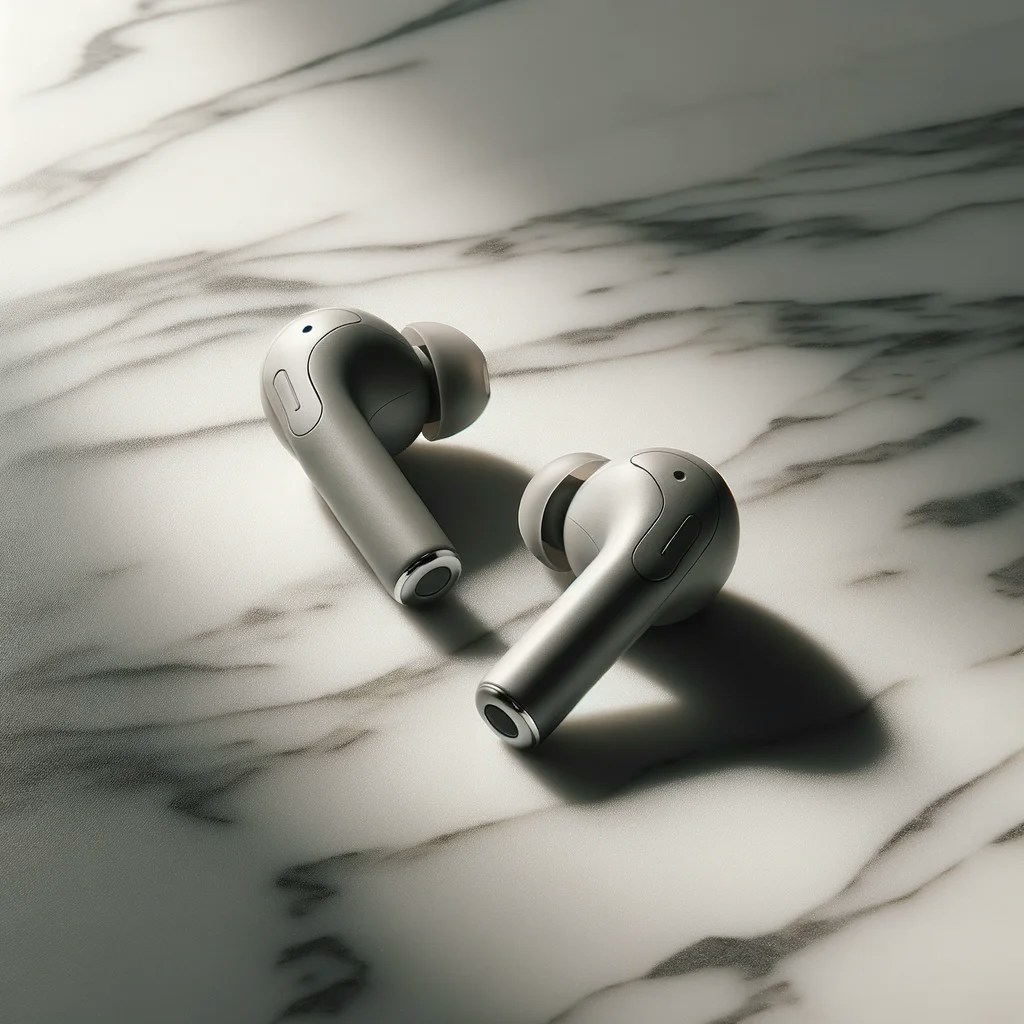
**Prompt:** *“Minimalist product photo of wireless earbuds on a marble background, soft shadows, studio lighting.”*\
**Parameters:** Resolution = 1024×1024, Style = Photographic, Lighting = Studio/Soft
👉 **Best for:** Product mockups, e-commerce images, clear conceptual renders.
***
### 🔹 DALL·E – Clean, Conceptual, Realistic
**Prompt:** *“Minimalist product photo of wireless earbuds on a marble background, soft shadows, studio lighting.”*\
**Parameters:** Resolution = 1024×1024, Style = Photographic, Lighting = Studio/Soft
👉 **Best for:** Product mockups, e-commerce images, clear conceptual renders.
 ***
### 🔹 Stable Diffusion – Flexible & Customizable
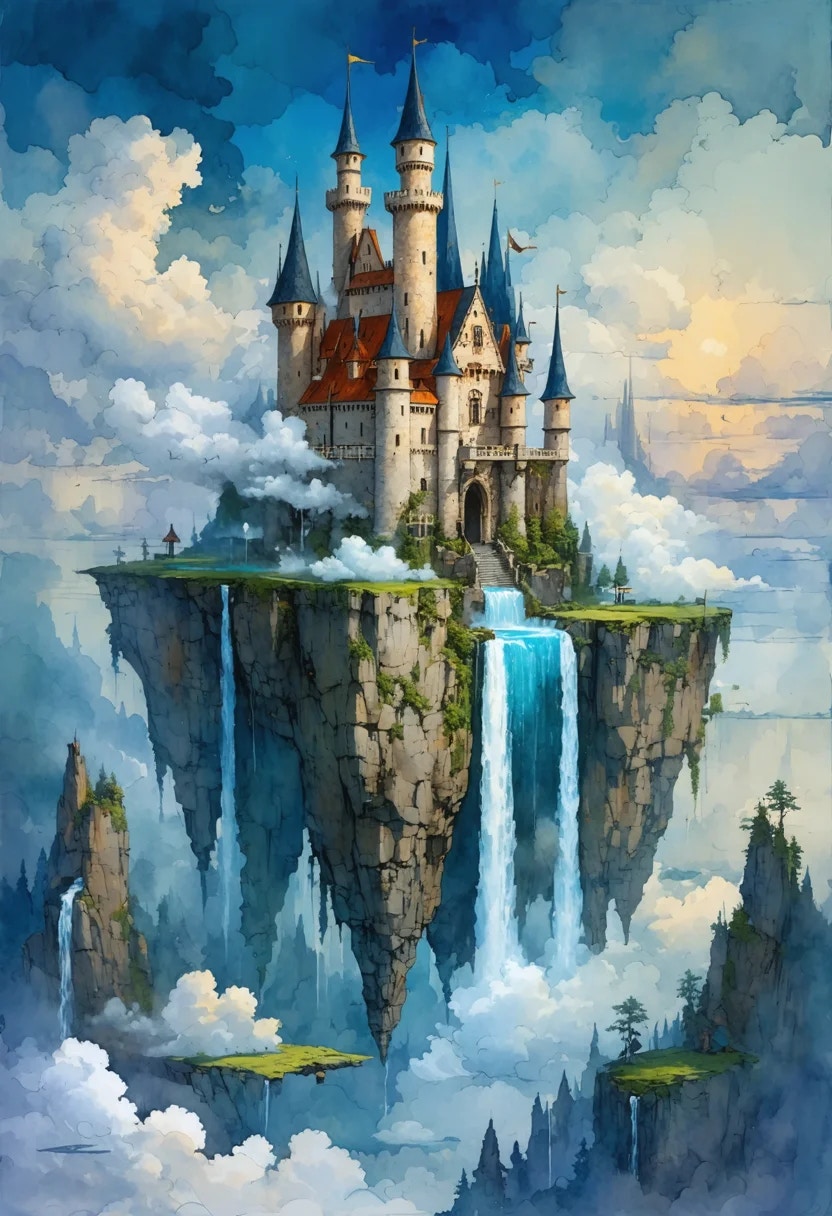
**Prompt:** *“A fantasy landscape of a floating castle surrounded by clouds and waterfalls, epic scale, realistic yet dreamlike atmosphere.”*\
**Parameters:** Aspect Ratio = 2:3 (portrait), Style = Realism, Lighting = Cinematic, Medium = Watercolor, Mood = Imaginative
👉 **Best for:** Posters, fantasy art, flexible aspect ratios, styled outputs.
***
### 🔹 Stable Diffusion – Flexible & Customizable
**Prompt:** *“A fantasy landscape of a floating castle surrounded by clouds and waterfalls, epic scale, realistic yet dreamlike atmosphere.”*\
**Parameters:** Aspect Ratio = 2:3 (portrait), Style = Realism, Lighting = Cinematic, Medium = Watercolor, Mood = Imaginative
👉 **Best for:** Posters, fantasy art, flexible aspect ratios, styled outputs.
 ***
### 🔹 Flux – Quick & Business-Ready
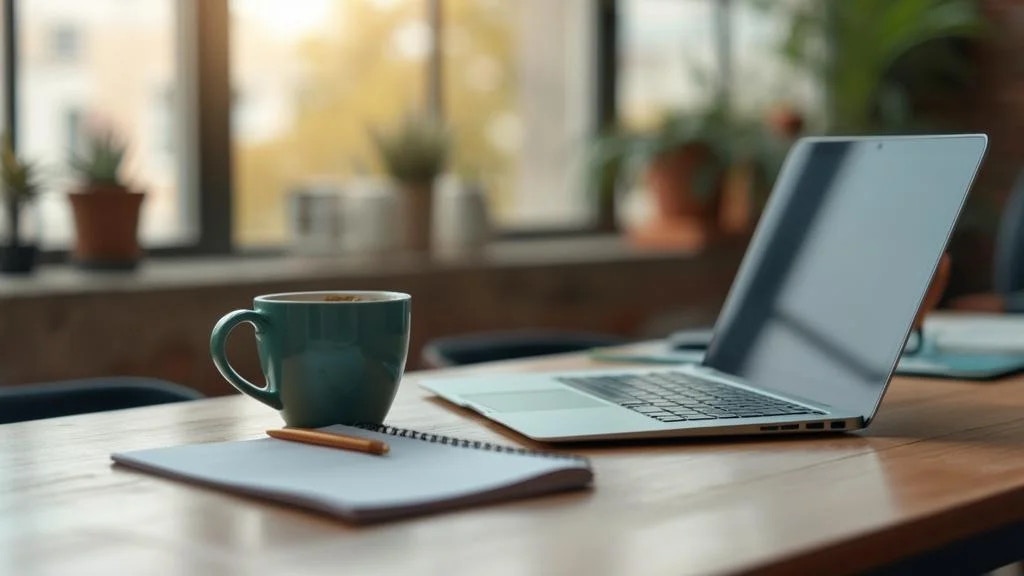
**Prompt:** *“An office workspace with a modern laptop, coffee mug, and notepad, bright and inviting atmosphere, productivity theme.”*\
**Parameters:** Resolution = Landscape, Style = Photographic, Lighting = Warm, Medium = Canvas, Mood = Cheerful
👉 **Best for:** Website headers, marketing visuals, fast square/portrait/landscape results.
***
### 🔹 Flux – Quick & Business-Ready
**Prompt:** *“An office workspace with a modern laptop, coffee mug, and notepad, bright and inviting atmosphere, productivity theme.”*\
**Parameters:** Resolution = Landscape, Style = Photographic, Lighting = Warm, Medium = Canvas, Mood = Cheerful
👉 **Best for:** Website headers, marketing visuals, fast square/portrait/landscape results.
 ***
### 🔹 Clipdrop – Practical Object Editing
**Prompt:** *“A pair of running shoes isolated on a pure white background, ecommerce-ready, high contrast.”*\
**Parameters:** Resolution = Square, Style = Photographic, Lighting = Studio/Soft
👉 **Best for:** Background removal, clean product shots, catalog images.
### 💡 Tips
* **Iterate:** Start with 1 image to refine your prompt/settings, then generate more.
* **Match aspect ratio to platform:** Square for Instagram, Portrait for Stories, Landscape for banners.
* **Use Mood + Lighting together:** “Cheerful + Warm” gives a very different vibe than “Dark + Dramatic.”
* **Save variations:** Use the View option to compare results across different parameter sets.
* **Credits:** Each generation consumes **Media Credits** from your subscription.
### 📌 Example Use Cases
* **Web Design:** Create hero images, banners, and decorative visuals.
* **Advertising:** Generate campaign visuals or seasonal creatives.
* **E-commerce:** Produce studio-quality, background-free product photos.
* **Social Media:** Generate eye-catching, platform-optimized content.
* **Content Marketing:** Visualize blog posts, infographics, and editorial illustrations.
* **Creative Exploration:** Experiment with moods, mediums, and artist-style presets for inspiration.
***
### 🔹 Clipdrop – Practical Object Editing
**Prompt:** *“A pair of running shoes isolated on a pure white background, ecommerce-ready, high contrast.”*\
**Parameters:** Resolution = Square, Style = Photographic, Lighting = Studio/Soft
👉 **Best for:** Background removal, clean product shots, catalog images.
### 💡 Tips
* **Iterate:** Start with 1 image to refine your prompt/settings, then generate more.
* **Match aspect ratio to platform:** Square for Instagram, Portrait for Stories, Landscape for banners.
* **Use Mood + Lighting together:** “Cheerful + Warm” gives a very different vibe than “Dark + Dramatic.”
* **Save variations:** Use the View option to compare results across different parameter sets.
* **Credits:** Each generation consumes **Media Credits** from your subscription.
### 📌 Example Use Cases
* **Web Design:** Create hero images, banners, and decorative visuals.
* **Advertising:** Generate campaign visuals or seasonal creatives.
* **E-commerce:** Produce studio-quality, background-free product photos.
* **Social Media:** Generate eye-catching, platform-optimized content.
* **Content Marketing:** Visualize blog posts, infographics, and editorial illustrations.
* **Creative Exploration:** Experiment with moods, mediums, and artist-style presets for inspiration.