> ## Documentation Index
> Fetch the complete documentation index at: https://docs.klyra.ai/llms.txt
> Use this file to discover all available pages before exploring further.
# AI Chat
> Klyra AI’s AI Chat lets you converse with 40+ pre-built assistants or build your own custom assistant—complete with real-time data, sharing, exporting, and voice features.
## Navigation
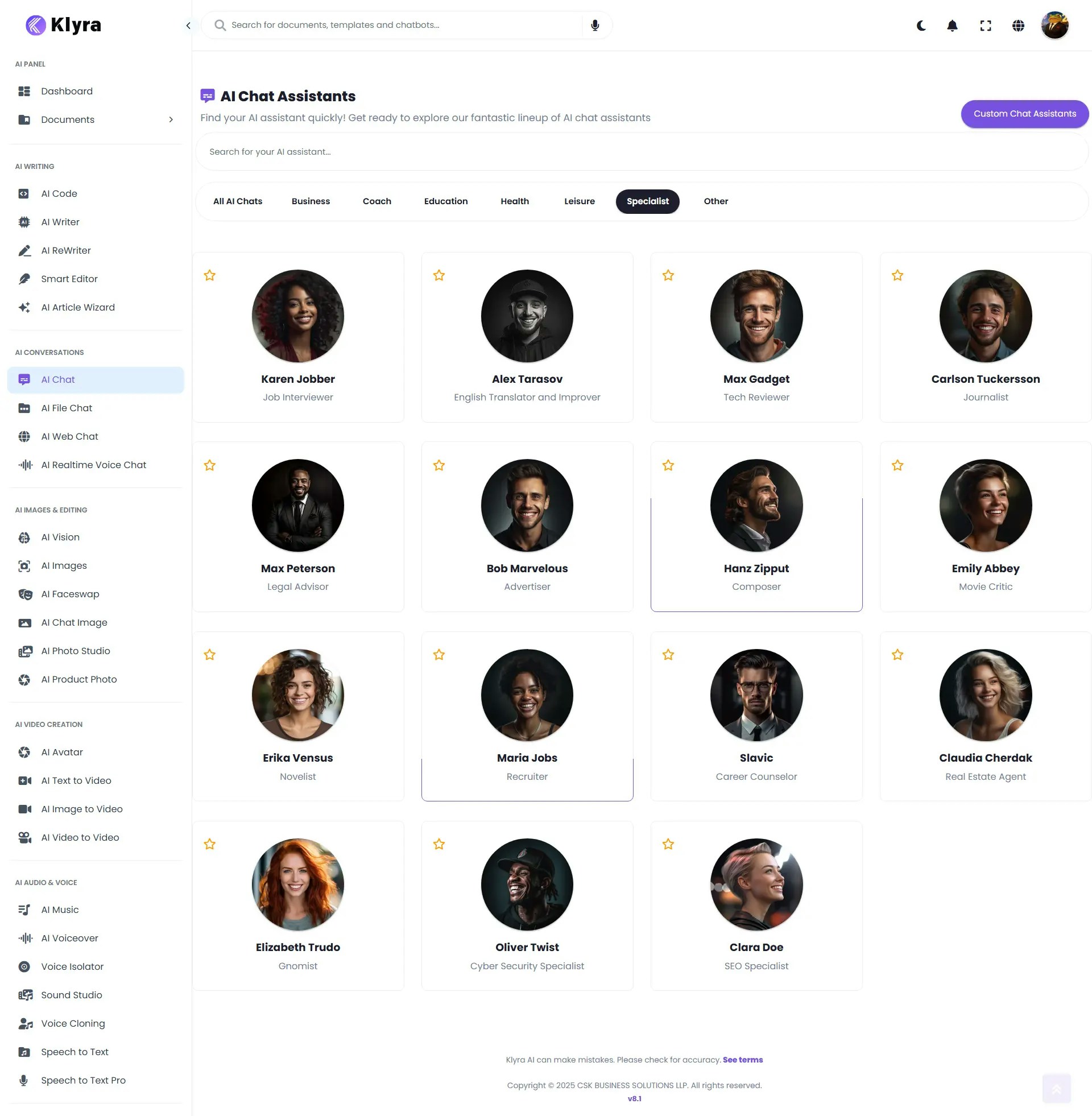
To access [**AI Chat**](https://klyra.ai/page/ai-chat) Assistants,
> 🔎 **Navigation:** Dashboard → Left Panel → AI Conversations → AI Chat
This opens **AI Chat Assistants** with:
* A gallery of **pre-built assistants** (ready to use).
* A **Custom Chat Assistant** button (top-right) for building your own.
 ## Use a pre-built chat assistant
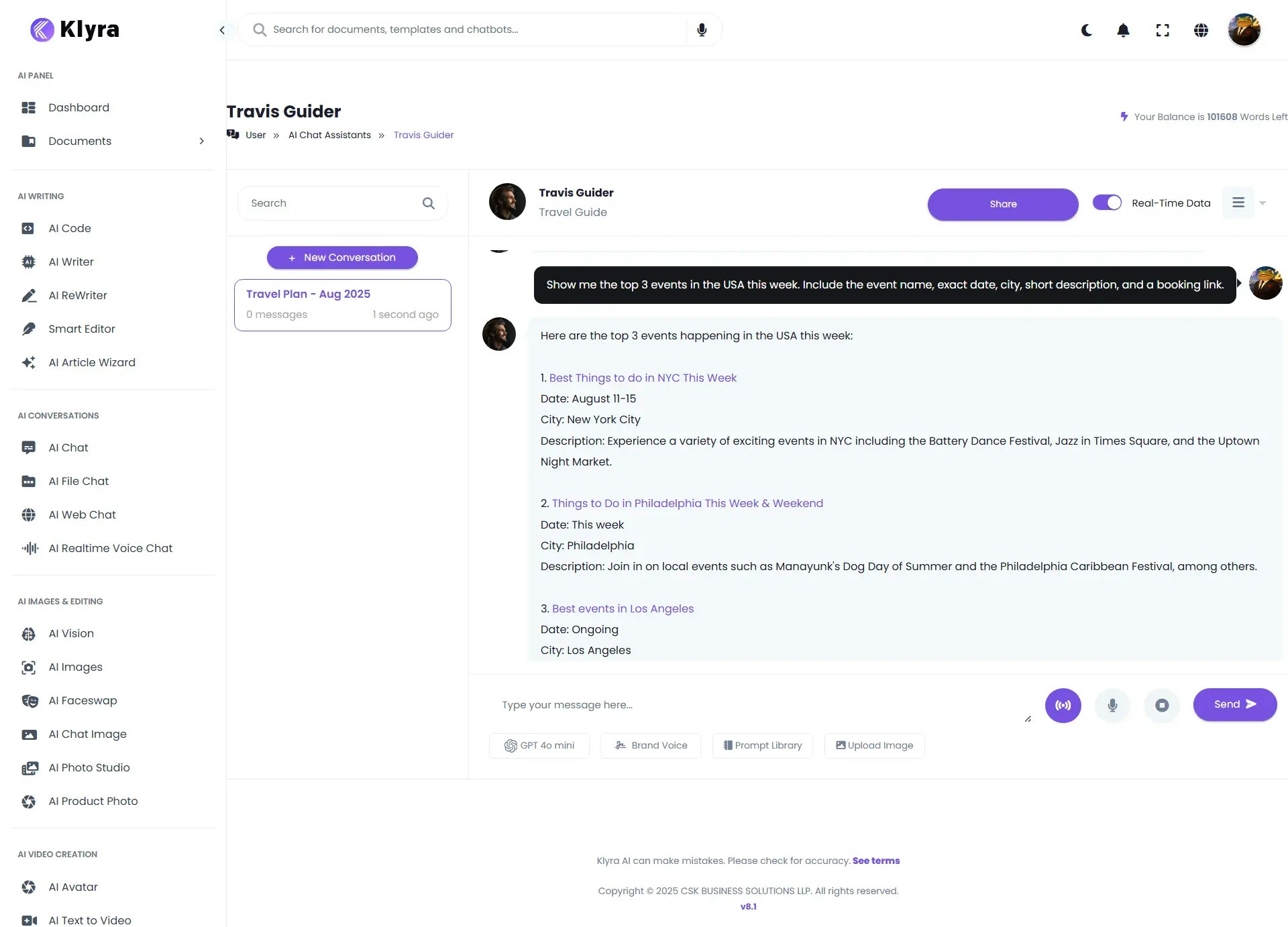
1. Go to **AI Chat** and browse the assistant categories.
2. Click any assistant to open a chat in the main area.
3. Type your question or task and press **Send**.
4. (Optional) Click **Share** (next to the assistant name) → **Generate Link** to share a read-only URL.
5. (Optional) Toggle **Real-Time Data** (beside Share) to let the assistant fetch current information in addition to its pre-training.
6. (Optional) **Export** the conversation as **Text**, **Word (.docx)**, or **PDF**.
## Use a pre-built chat assistant
1. Go to **AI Chat** and browse the assistant categories.
2. Click any assistant to open a chat in the main area.
3. Type your question or task and press **Send**.
4. (Optional) Click **Share** (next to the assistant name) → **Generate Link** to share a read-only URL.
5. (Optional) Toggle **Real-Time Data** (beside Share) to let the assistant fetch current information in addition to its pre-training.
6. (Optional) **Export** the conversation as **Text**, **Word (.docx)**, or **PDF**.
 ### Pre-built assistants (by category)
**Business:** Financial Analyst, Investment Manager, Accountant\
**Coach:** Motivational Coach, Relationship Coach, Life Coach, Personal Trainer, Talent Coach, Debate Coach, Motivational Speaker\
**Education:** Screenwriter, Storyteller, Poet, Philosopher, AI Writing Tutor, Academician\
**Health:** Mental Health Adviser, AI Assistant Doctor, Psychologist\
**Leisure:** Travel Guide, Stand-up Comedian, Chef, Social Media Influencer\
**Specialist:** Job Interviewer, Alex Tarasov, English Translator & Improver, Tech Reviewer, Journalist, Legal Advisor, Advertiser, Composer, Movie Critic, Novelist, Recruiter, Career Counselor, Real Estate Agent, Gnomist, Cyber Security Specialist, SEO Specialist\
**Other:** Drunk Person, Friend, Rapper
### Sharing & real-time data
* **Share:** Click **Share → Generate Link** to get a URL for friends/teammates.
* **Real-Time Data:** Toggle on to augment responses with current web information (where supported).
🔐 **Privacy tip:** Shared links may expose conversation content. Remove sensitive data before sharing.
### Voice & hands-free modes
* **Realtime Voice Chat (voice ↔ voice):**\
Toggle the **voice icon** next to the message box to speak to the assistant and hear responses.\
The full text transcript is still stored in the conversation for export.
* **Hands-free prompting (mic to text):**\
Click the **microphone icon** (next to voice mode) to dictate your prompt. It populates the input area; press **Send** to submit.
🔊 Use voice mode for live brainstorming; use hands-free prompting to draft complex prompts quickly, then edit before sending.
### Export conversations
From the chat window, choose **Export** → **Text**, **Word**, or **PDF** to download a copy of the conversation.
🧩 **Good practice:** Rename the exported file with the assistant name and date for easy filing (e.g., `Investment-Manager_2025-08-17.pdf`).
## Create a Custom Chat Assistant
Click **Custom Chat Assistant** (top-right of AI Chat Assistants) and complete the form:
1. **Chat Assistant Avatar** – Click **Browse** and upload an image.
2. **Activate Chat Assistant** – Toggle **Enable/Disable**.
3. **Assistant Name** – A clear, searchable name.
4. **Role Description** – One-line identity (e.g., *Finance Expert*).
5. **Welcome Message** *(Optional)* – The first message users see.
6. **Group** – Select: Business, Coach, Education, Health, Leisure, Specialist, Other.
7. **Instructions** – Detailed behavior/goals, input/output format, tone, constraints.
8. **Knowledge Retrieval Tool** – **Enable** if you want the assistant to use uploaded files or allow uploads during chat.
9. **Code Interpreter Tool** – **Enable** if the assistant should run code/calculations.
10. **File Access** *(Optional)* – **Browse** to upload documents to ground the assistant’s answers (requires **Knowledge Retrieval** enabled).
11. Click **Create**. Your assistant appears in **AI Chat Assistants**.
**Example:**
You are a \ helping with \.
Always:
* Ask 1 clarifying question if requirements are ambiguous.
* Cite source filenames when using uploaded files.
* Return answers in \ with headings and bullet points.
Tone: \.
📎 **Files & retrieval:** If you upload a file but **don’t** enable **Knowledge Retrieval**, the assistant won’t consider it. Turn the toggle **on** whenever file grounding matters.
### 📌 Example Use Cases
* **Business:** Use the *Financial Analyst* to quickly analyze quarterly reports or the *Investment Manager* to evaluate risk strategies.
* **Education:** Let the *AI Writing Tutor* review essays or the *Philosopher* generate debate topics.
* **Health:** Use the *Mental Health Adviser* for stress-relief exercises or the *AI Assistant Doctor* for general medical guidance.
* **Leisure:** Ask the *Travel Guide* to plan itineraries or the *Chef* to suggest recipes with ingredients you already have.
* **Specialist:** Use the *SEO Specialist* for keyword suggestions or the *Cyber Security Specialist* for best practices in data protection.
* **Other:** Try the *Rapper* for fun lyric generation or *Friend* for casual conversations.
* **Custom Assistant:** Build a domain-specific bot (e.g., “HR Interview Prep Coach” or “Legal Document Explainer”) tailored to your workflows.
### Troubleshooting
* **No file context in answers?** Ensure **Knowledge Retrieval** is **enabled** and the file is attached.
* **No calculations/plots?** Turn on **Code Interpreter Tool**.
* **Voice not working?** Check mic permissions in your browser and give it a try again.
* **Pre-built assistant missing?** Use the **search** bar at the top of the AI Chat Assistants page or check the **Group** filter.
### Pre-built assistants (by category)
**Business:** Financial Analyst, Investment Manager, Accountant\
**Coach:** Motivational Coach, Relationship Coach, Life Coach, Personal Trainer, Talent Coach, Debate Coach, Motivational Speaker\
**Education:** Screenwriter, Storyteller, Poet, Philosopher, AI Writing Tutor, Academician\
**Health:** Mental Health Adviser, AI Assistant Doctor, Psychologist\
**Leisure:** Travel Guide, Stand-up Comedian, Chef, Social Media Influencer\
**Specialist:** Job Interviewer, Alex Tarasov, English Translator & Improver, Tech Reviewer, Journalist, Legal Advisor, Advertiser, Composer, Movie Critic, Novelist, Recruiter, Career Counselor, Real Estate Agent, Gnomist, Cyber Security Specialist, SEO Specialist\
**Other:** Drunk Person, Friend, Rapper
### Sharing & real-time data
* **Share:** Click **Share → Generate Link** to get a URL for friends/teammates.
* **Real-Time Data:** Toggle on to augment responses with current web information (where supported).
🔐 **Privacy tip:** Shared links may expose conversation content. Remove sensitive data before sharing.
### Voice & hands-free modes
* **Realtime Voice Chat (voice ↔ voice):**\
Toggle the **voice icon** next to the message box to speak to the assistant and hear responses.\
The full text transcript is still stored in the conversation for export.
* **Hands-free prompting (mic to text):**\
Click the **microphone icon** (next to voice mode) to dictate your prompt. It populates the input area; press **Send** to submit.
🔊 Use voice mode for live brainstorming; use hands-free prompting to draft complex prompts quickly, then edit before sending.
### Export conversations
From the chat window, choose **Export** → **Text**, **Word**, or **PDF** to download a copy of the conversation.
🧩 **Good practice:** Rename the exported file with the assistant name and date for easy filing (e.g., `Investment-Manager_2025-08-17.pdf`).
## Create a Custom Chat Assistant
Click **Custom Chat Assistant** (top-right of AI Chat Assistants) and complete the form:
1. **Chat Assistant Avatar** – Click **Browse** and upload an image.
2. **Activate Chat Assistant** – Toggle **Enable/Disable**.
3. **Assistant Name** – A clear, searchable name.
4. **Role Description** – One-line identity (e.g., *Finance Expert*).
5. **Welcome Message** *(Optional)* – The first message users see.
6. **Group** – Select: Business, Coach, Education, Health, Leisure, Specialist, Other.
7. **Instructions** – Detailed behavior/goals, input/output format, tone, constraints.
8. **Knowledge Retrieval Tool** – **Enable** if you want the assistant to use uploaded files or allow uploads during chat.
9. **Code Interpreter Tool** – **Enable** if the assistant should run code/calculations.
10. **File Access** *(Optional)* – **Browse** to upload documents to ground the assistant’s answers (requires **Knowledge Retrieval** enabled).
11. Click **Create**. Your assistant appears in **AI Chat Assistants**.
**Example:**
You are a \ helping with \.
Always:
* Ask 1 clarifying question if requirements are ambiguous.
* Cite source filenames when using uploaded files.
* Return answers in \ with headings and bullet points.
Tone: \.
📎 **Files & retrieval:** If you upload a file but **don’t** enable **Knowledge Retrieval**, the assistant won’t consider it. Turn the toggle **on** whenever file grounding matters.
### 📌 Example Use Cases
* **Business:** Use the *Financial Analyst* to quickly analyze quarterly reports or the *Investment Manager* to evaluate risk strategies.
* **Education:** Let the *AI Writing Tutor* review essays or the *Philosopher* generate debate topics.
* **Health:** Use the *Mental Health Adviser* for stress-relief exercises or the *AI Assistant Doctor* for general medical guidance.
* **Leisure:** Ask the *Travel Guide* to plan itineraries or the *Chef* to suggest recipes with ingredients you already have.
* **Specialist:** Use the *SEO Specialist* for keyword suggestions or the *Cyber Security Specialist* for best practices in data protection.
* **Other:** Try the *Rapper* for fun lyric generation or *Friend* for casual conversations.
* **Custom Assistant:** Build a domain-specific bot (e.g., “HR Interview Prep Coach” or “Legal Document Explainer”) tailored to your workflows.
### Troubleshooting
* **No file context in answers?** Ensure **Knowledge Retrieval** is **enabled** and the file is attached.
* **No calculations/plots?** Turn on **Code Interpreter Tool**.
* **Voice not working?** Check mic permissions in your browser and give it a try again.
* **Pre-built assistant missing?** Use the **search** bar at the top of the AI Chat Assistants page or check the **Group** filter.