> ## Documentation Index
> Fetch the complete documentation index at: https://docs.klyra.ai/llms.txt
> Use this file to discover all available pages before exploring further.
# AI YouTube
> Transform any YouTube video into written content in seconds. Whether it's a blog post, summary, or outline, AI YouTube helps you repurpose videos into high-quality, readable formats.
## Introduction
The **AI YouTube** tool is designed to help you extract and repurpose the value of YouTube videos into engaging written content. Whether you're creating blog posts, content summaries, or marketing material, this feature turns long-form video content into structured, well-written formats without manual transcription or editing.
From simplifying complex topics to highlighting main ideas, outlining structure, or analyzing pros and cons, AI YouTube gives you full creative control with language, tone, and AI model customization.
## How to Use AI YouTube
To get started, go to the **AI Connect & Integrations** in the left panel and click on the **AI YouTube** tab.
Follow the steps below to generate written content from a YouTube video:
Paste the full URL of the YouTube video you want to convert into content.
> Example: [https://youtu.be/5aFNfWHDgM8?si=K9IFaZ9mn1kQmbKK](https://youtu.be/5aFNfWHDgM8?si=K9IFaZ9mn1kQmbKK)
From the **Action** dropdown, select what kind of content you want to generate:
* Create a Blog Post
* Create Outlines
* Explain Main Idea
* Create Expanded Description
* Summarize the Content
* Prepare Pros and Cons
Each action tailors the output to match a specific use case or content goal.
Just like AI RSS, you can personalize your content using the following controls:
* **Language** – Select the input language (e.g., English, Spanish, French).
* **AI Model** – Choose from the list of available GPT models based on your subscription tier.
* **Creativity** – Choose how original, structured, or imaginative the content should be:\
*Original*, *Creative*, *Repetitive*, *Imaginative*, or *Deterministic*.
* **Tone of Voice** – Select from 20+ tone options like *Professional*, *Exciting*, *Conversational*, etc.
* **Point of View** – Choose between *First Person*, *Second Person*, or *Third Person*.
* **Number of Results** – Specify how many content versions you'd like generated (default is 1).
Once everything is configured, click the **Generate** button.\
The system will analyze the video and generate content based on your selected action and preferences.
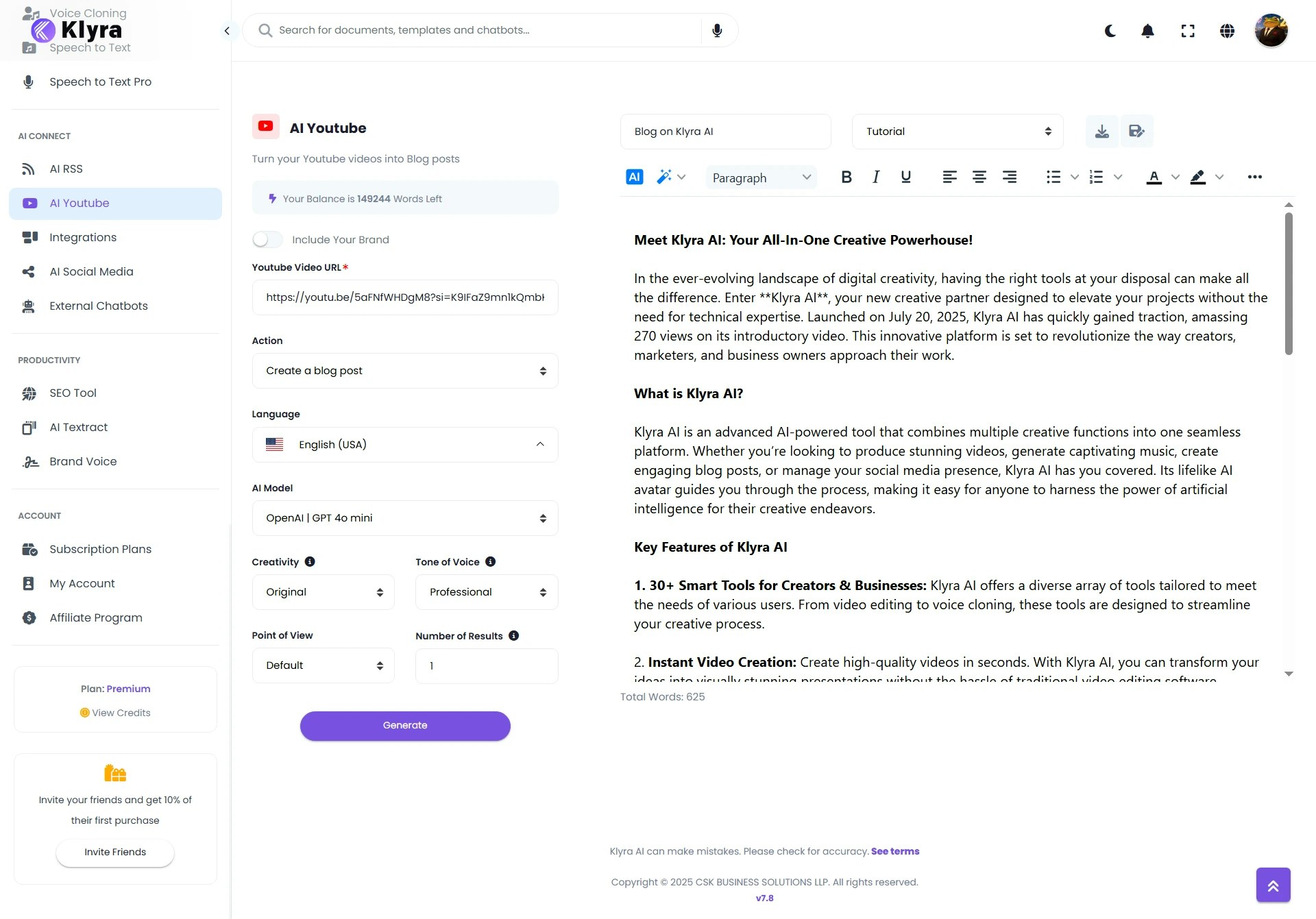 1. Review the generated content
2. Enter a document name
3. Click **Save**
The final document will appear under **Documents** in the **AI Panel**, where you can view, edit, or download it later.
### 🧠 Pro Tips
* Use “Summarize the Content” for quick takeaways on long-form videos.
* “Create Blog Post” is ideal for repurposing tutorials, interviews, or webinars.
* Adjust the tone and point of view to match your brand or target audience.
* Works best with publicly available videos that include transcripts or clear speech.
### 📌 Example Use Cases
* **Blog Generation**: Convert YouTube videos into structured blog posts for cross-platform reach.
* **Content Repurposing**: Summarize video content into outlines or bullet points for LinkedIn articles.
* **Educational Use**: Extract the main ideas from lectures or tutorials and generate study notes.
* **Marketing Assets**: Expand video descriptions into SEO-optimized content for better discoverability.
* **Decision-Making**: Generate pros and cons from product review videos to support informed choices.
Pair “Summarize the content” with “Prepare Pros and Cons” to quickly compare multiple videos before creating final content.
1. Review the generated content
2. Enter a document name
3. Click **Save**
The final document will appear under **Documents** in the **AI Panel**, where you can view, edit, or download it later.
### 🧠 Pro Tips
* Use “Summarize the Content” for quick takeaways on long-form videos.
* “Create Blog Post” is ideal for repurposing tutorials, interviews, or webinars.
* Adjust the tone and point of view to match your brand or target audience.
* Works best with publicly available videos that include transcripts or clear speech.
### 📌 Example Use Cases
* **Blog Generation**: Convert YouTube videos into structured blog posts for cross-platform reach.
* **Content Repurposing**: Summarize video content into outlines or bullet points for LinkedIn articles.
* **Educational Use**: Extract the main ideas from lectures or tutorials and generate study notes.
* **Marketing Assets**: Expand video descriptions into SEO-optimized content for better discoverability.
* **Decision-Making**: Generate pros and cons from product review videos to support informed choices.
Pair “Summarize the content” with “Prepare Pros and Cons” to quickly compare multiple videos before creating final content.