> ## Documentation Index
> Fetch the complete documentation index at: https://docs.klyra.ai/llms.txt
> Use this file to discover all available pages before exploring further.
# Voice Isolator
> Extract crystal-clear speech from any audio file with Klyra AI’s Voice Isolator, engineered to remove noise, mic feedback, and background interference for professional-quality audio.
## Introduction
The [**Voice Isolator**](https://klyra.ai/page/ai-voice-isolator) feature enhances your audio files by **removing unwanted noise** and preserving the clarity of the speaker’s voice. Whether it’s street sounds, mic feedback, or environmental noise, Voice Isolator cleans your recordings to ensure your message comes through with precision.
Key highlights:
* Upload files in multiple formats up to **500MB**.
* AI-powered noise reduction for **professional sound quality**.
* Ideal for **podcasts, interviews, voiceovers, or meeting recordings**.
 ## How to Use
This feature is available only with a paid subscription plan.
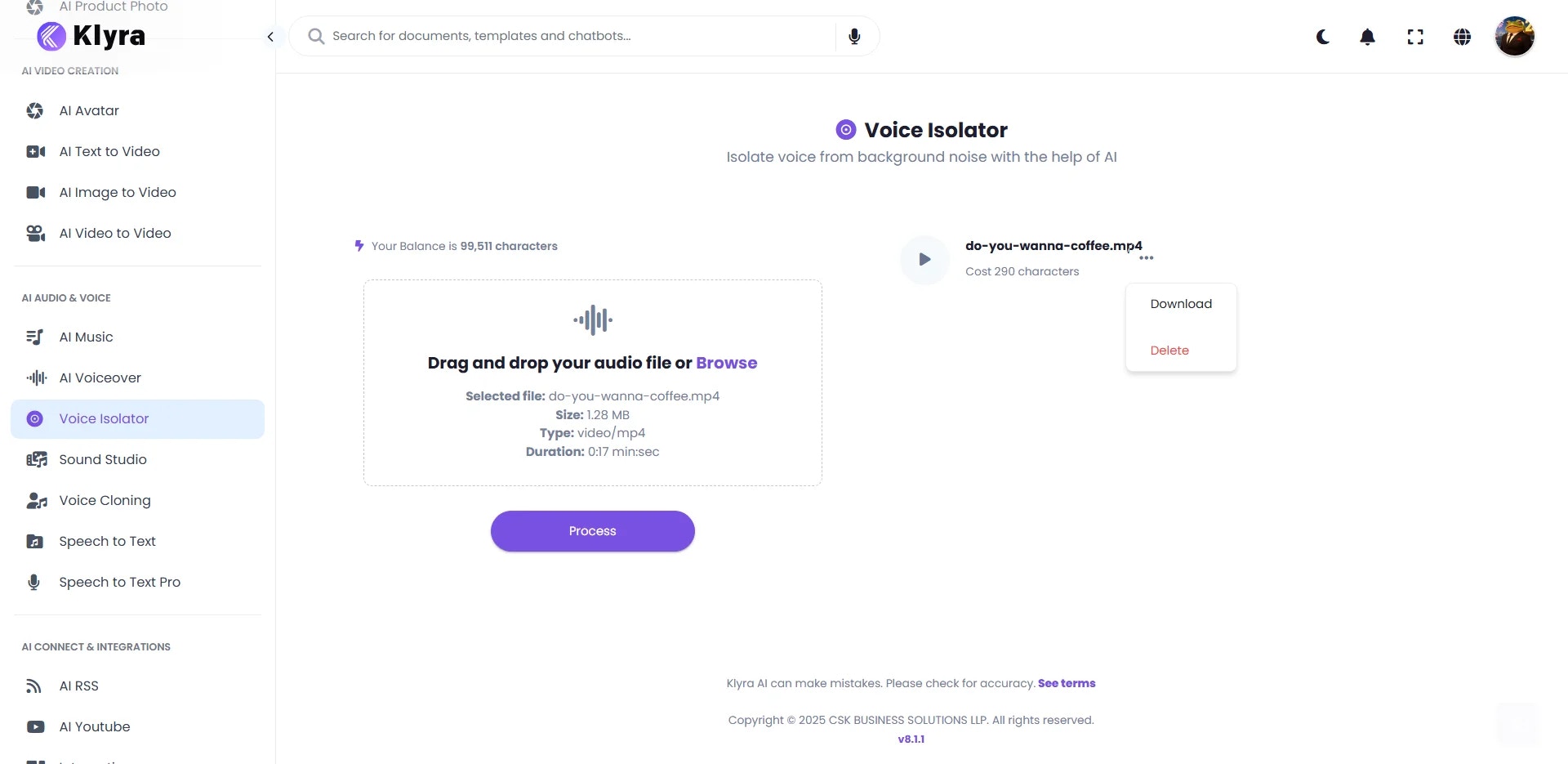
In your **Dashboard**, go to:\
**Left Panel → AI Audio & Voice → Voice Isolator**.
* Upload your audio file using **Drag & Drop** or **Browse**.
* Supported formats: **.mp3, .mp4, .ogg, .mpeg, .mpga, .m4a, .wav, .webm**.
* File size limit: **Up to 500MB**.
* Minimum duration: **4.6 seconds**
* Once the file is uploaded, click **Process**.
* The AI engine will isolate speech and remove background noise automatically.
* The processed, noise-free audio file will appear as the final result on the right side of the workspace.
* Options available: **Play, Download, or Delete** the cleaned audio.
***🔊 Before (original noisy input)***
***🔊 After (processed clean output)***
### 💡 Tips
* **Use high-quality recordings when possible** → Cleaner input results in even better isolation.
* **Perfect for reusing audio** → Clean old recordings and repurpose them for new projects.
* **Great for remote work** → Improve clarity of meeting recordings or webinars.
* **Pair with Voiceover tools** → Combine clean speech with professional AI-generated voiceovers for polished content.
* **Save storage** → Export only the final clean version if the original isn’t needed.
### 📌 Example Use Cases
* **Podcasters** → Remove background hum, traffic noise, or room echo from interviews.
* **Content Creators** → Clean up narration audio before syncing with video projects.
* **Businesses** → Enhance meeting or webinar recordings for clearer transcripts and archives.
* **Educators** → Improve clarity of lecture recordings for students.
* **Journalists** → Extract clean speech from field interviews in noisy environments.
* **Customer Support Teams** → Clean call recordings for training and analysis.
## How to Use
This feature is available only with a paid subscription plan.
In your **Dashboard**, go to:\
**Left Panel → AI Audio & Voice → Voice Isolator**.
* Upload your audio file using **Drag & Drop** or **Browse**.
* Supported formats: **.mp3, .mp4, .ogg, .mpeg, .mpga, .m4a, .wav, .webm**.
* File size limit: **Up to 500MB**.
* Minimum duration: **4.6 seconds**
* Once the file is uploaded, click **Process**.
* The AI engine will isolate speech and remove background noise automatically.
* The processed, noise-free audio file will appear as the final result on the right side of the workspace.
* Options available: **Play, Download, or Delete** the cleaned audio.
***🔊 Before (original noisy input)***
***🔊 After (processed clean output)***
### 💡 Tips
* **Use high-quality recordings when possible** → Cleaner input results in even better isolation.
* **Perfect for reusing audio** → Clean old recordings and repurpose them for new projects.
* **Great for remote work** → Improve clarity of meeting recordings or webinars.
* **Pair with Voiceover tools** → Combine clean speech with professional AI-generated voiceovers for polished content.
* **Save storage** → Export only the final clean version if the original isn’t needed.
### 📌 Example Use Cases
* **Podcasters** → Remove background hum, traffic noise, or room echo from interviews.
* **Content Creators** → Clean up narration audio before syncing with video projects.
* **Businesses** → Enhance meeting or webinar recordings for clearer transcripts and archives.
* **Educators** → Improve clarity of lecture recordings for students.
* **Journalists** → Extract clean speech from field interviews in noisy environments.
* **Customer Support Teams** → Clean call recordings for training and analysis.