> ## Documentation Index
> Fetch the complete documentation index at: https://docs.klyra.ai/llms.txt
> Use this file to discover all available pages before exploring further.
# AI Voice Cloning
> Clone your own voice to synthesize any text with Klyra AI’s Voice Cloning feature — powered by cutting-edge AI and deep learning algorithms.
## Introduction
The [**Voice Cloning**](https://klyra.ai/page/ai-voice-cloning) feature enables you to create a **digital twin of your voice** with lifelike accuracy. Using advanced AI, Klyra AI captures the unique **tone, pitch, and vocal characteristics** of your samples to generate a convincing voice model.
* **Content creators** can use it for audiobooks or podcasts.
* **Businesses** can apply it in virtual assistants or customer service.
* **Developers & gamers** can bring characters to life with custom voices.
Voice Cloning provides a **personalized, scalable way** to generate speech while saving time and costs on repeated recordings.
Access to this feature is only available with a **Premium** subscription plan.
## How to Use
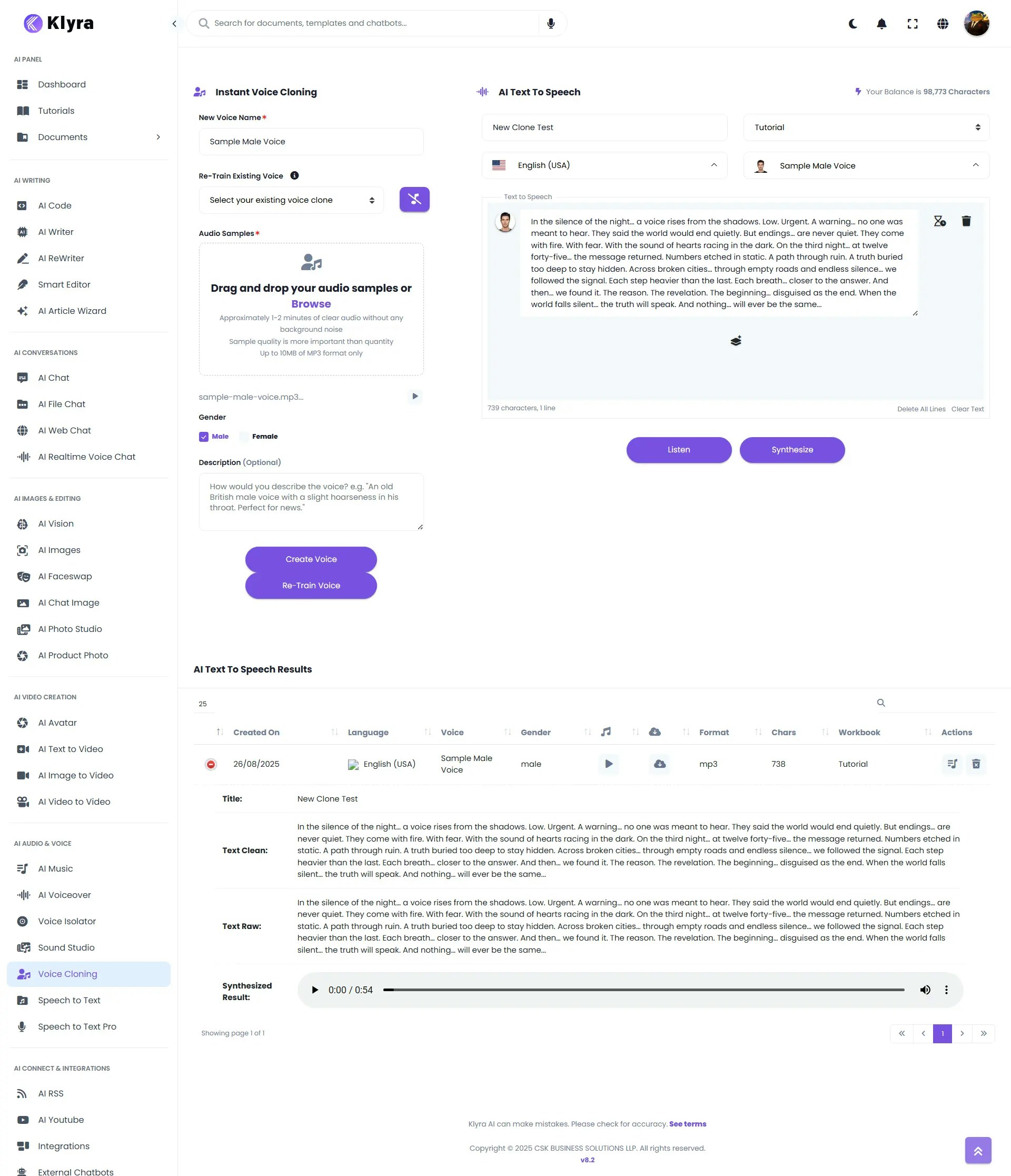
> 🔎 **Navigation:** Dashboard → Left Panel → AI Audio & Voice → Voice Cloning
In the **Voice Cloning tab**, you can either:
* **Create New Voice Clone**, or
* **Re-Train Existing Voice Clone**.
1. **Voice Name** — Assign a name to identify your cloned voice.
2. **Re-Train Existing Voice** (optional) — Select an already cloned voice if you want to retrain and improve it.
3. **Upload Audio Samples** — Provide short, high-quality recordings of your voice:
* Ensure recordings are **clear, natural, and free from background noise**.
* Multiple samples improve accuracy.
4. **Select Gender** — For metadata only (does not affect voice quality).
5. **Optional Description** — Add notes for personal reference (e.g., *“Podcast Narration Voice”*).
* If creating a new clone → click **Create Voice**.
* If retraining an existing clone → click **Re-Train Voice**.
* The system will process your samples and generate a usable digital voice.
* Successfully cloned voices will be available in your ****Voice Cloning →AI Text to Speech**** .
* You can generate voiceovers in your cloned voice using ****AI Text to Speech feature available inVoice Cloning****
* Your generated voiceover appears in **AI Text to Speech Results** below the workspace.
* It is also stored under **AI Panel → Documents → All Voiceovers** for future reference.
 ### 💡 Tips
* **Use clean recordings** → Avoid background noise, music, or overlapping voices.
* **Record naturally** → Speak at a normal pace and vary intonation for better results.
* **Use multiple samples** → Upload diverse audio clips (different phrases, tones) for more accuracy.
* **Retrain periodically** → If the voice sounds inconsistent, retrain using fresh samples.
* **Stay within clone limits** → Manage your Elevenlabs account quota by deleting unused clones.
### 📌 Example Use Cases
* **Audiobooks & Podcasts** → Narrate entire books or episodes in your own voice without hours of recording.
* **Customer Service** → Power virtual assistants or IVR systems with a familiar, human-like voice.
* **E-learning & Training** → Generate lessons or onboarding sessions with consistent narration.
* **Gaming & Entertainment** → Give characters unique, realistic voices.
* **Accessibility** → Provide a personalized reading voice for visually impaired users.
* **Content Localization** → Translate and synthesize your voice in multiple languages.
### ⚠️ Responsible Use Notice
Voice Cloning is a powerful tool designed to replicate **your own voice** or voices you have **explicit permission to use**.
* **Do not clone voices without consent.** Cloning unauthorized voices (such as celebrities, colleagues, or any individual without their permission) can violate privacy, intellectual property rights, and ethical guidelines.
* **Use for personal or business-approved purposes only.** Ensure you have the right to use any voice you submit to the platform.
* **Respect copyright and privacy laws.** Misuse of cloned voices for impersonation, fraud, or deceptive purposes is strictly prohibited.
Klyra AI is committed to **ethical AI use**, and we encourage all users to apply Voice Cloning responsibly.
### 💡 Tips
* **Use clean recordings** → Avoid background noise, music, or overlapping voices.
* **Record naturally** → Speak at a normal pace and vary intonation for better results.
* **Use multiple samples** → Upload diverse audio clips (different phrases, tones) for more accuracy.
* **Retrain periodically** → If the voice sounds inconsistent, retrain using fresh samples.
* **Stay within clone limits** → Manage your Elevenlabs account quota by deleting unused clones.
### 📌 Example Use Cases
* **Audiobooks & Podcasts** → Narrate entire books or episodes in your own voice without hours of recording.
* **Customer Service** → Power virtual assistants or IVR systems with a familiar, human-like voice.
* **E-learning & Training** → Generate lessons or onboarding sessions with consistent narration.
* **Gaming & Entertainment** → Give characters unique, realistic voices.
* **Accessibility** → Provide a personalized reading voice for visually impaired users.
* **Content Localization** → Translate and synthesize your voice in multiple languages.
### ⚠️ Responsible Use Notice
Voice Cloning is a powerful tool designed to replicate **your own voice** or voices you have **explicit permission to use**.
* **Do not clone voices without consent.** Cloning unauthorized voices (such as celebrities, colleagues, or any individual without their permission) can violate privacy, intellectual property rights, and ethical guidelines.
* **Use for personal or business-approved purposes only.** Ensure you have the right to use any voice you submit to the platform.
* **Respect copyright and privacy laws.** Misuse of cloned voices for impersonation, fraud, or deceptive purposes is strictly prohibited.
Klyra AI is committed to **ethical AI use**, and we encourage all users to apply Voice Cloning responsibly.