> ## Documentation Index
> Fetch the complete documentation index at: https://docs.klyra.ai/llms.txt
> Use this file to discover all available pages before exploring further.
# AI Voiceover
> Convert your scripts into natural, lifelike speech with Klyra AI’s Text-to-Speech (TTS) engine. Choose from thousands of voices, 140+ languages, and multiple AI vendors to produce professional audio in minutes.
## Introduction
The [**AI Voiceover**](https://klyra.ai/page/ai-voiceover) feature in Klyra AI unlocks advanced **text-to-speech** capabilities, helping you generate realistic narrations, ads, training audio, and more.
With access to **six AI vendors** — **Elevenlabs, AWS, GCP, Azure, OpenAI, and Speechify** — you can synthesize voices in **thousands of variations across 140+ languages and dialects**.
This makes it a versatile tool for **educators, marketers, podcasters, accessibility providers, and content creators**.
## How to Use
### Navigation
> 🔎 **Navigation:** Dashboard → Left Panel → AI Audio & Voice → AI Voiceover
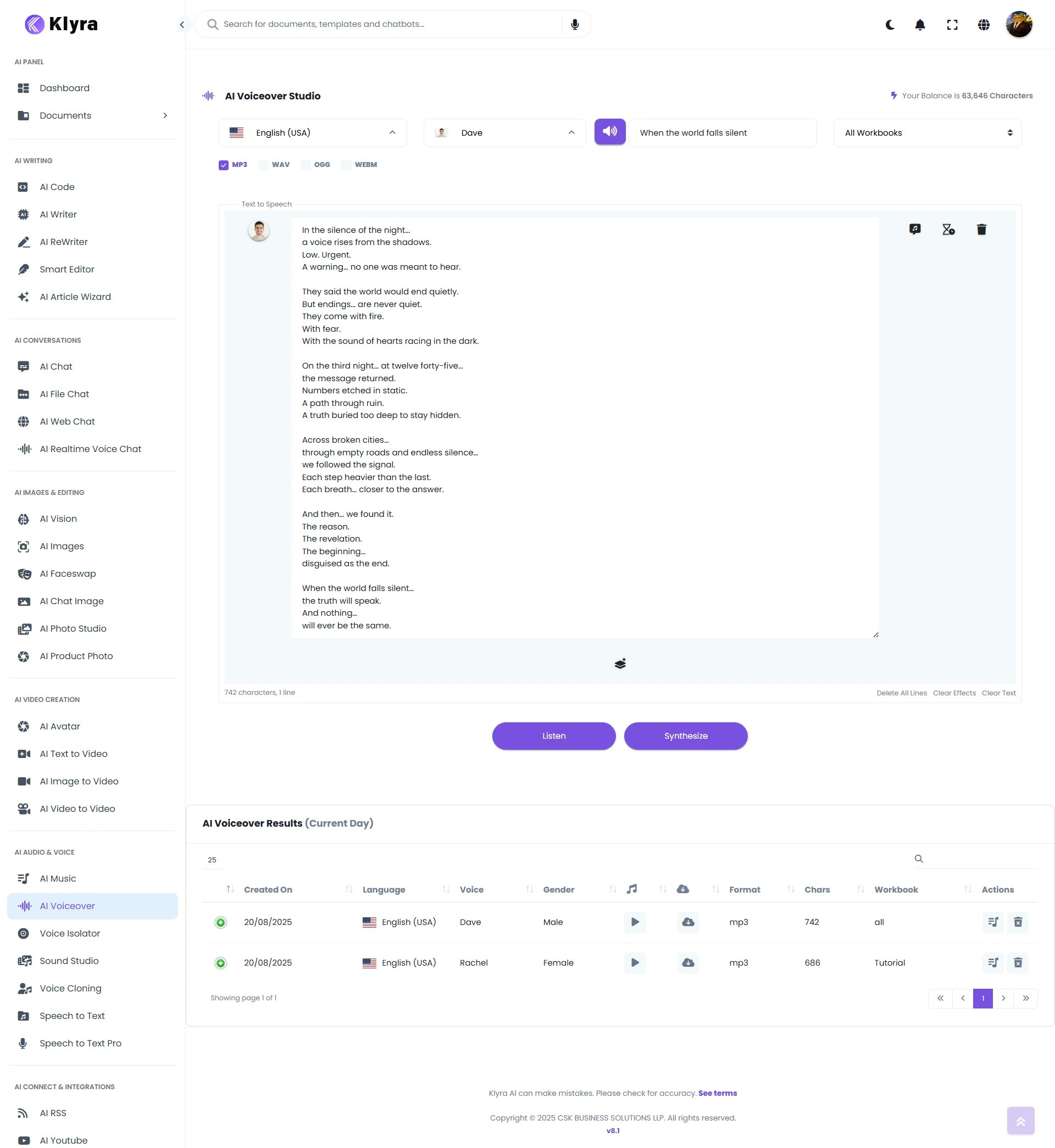 * Select from 140+ supported languages and dialects.
* Example: *English (US), Spanish (MX), French (FR), Hindi (IN)*.
* Browse available voices from the supported AI vendors.
* A **🔊** **voice preview button** is available to audition vendor samples.
* **Title:** Enter a title to help organize your script.
* **Script:** Paste or write the text you want converted into speech.
* Some vendors (AWS, GCP) support **SSML (Speech Synthesis Markup Language)** tags for advanced control (pauses, emphasis, speed, etc.).
* Choose the audio format best suited to your use case:
* **MP3** — lightweight, web-friendly.
* **WAV** — uncompressed, studio quality.
* **OGG / WEBM** — optimized for web applications.
* After entering your script and format, you’ll see two options:
* **Listen** — Quickly renders your *current script* so you can audition the result.
* **Synthesize** — Produces the **final voiceover file** in your chosen format.
Both **Listen and Synthesize consume Character credits** based on the script length.
👉 To save credits, try **Listen** with a short sample before synthesizing the full script.
* Your generated voiceover appears in **AI Voiceover Results** below the workspace.
* It is also stored under **AI Panel → Documents → All Voiceovers** for future reference.
* For vendors like **AWS** and **GCP**, you can insert **SSML tags** into your script.
* Examples:
* `` → Adds a pause.
* `important` → Stresses a word.
* `This part is slower` → Adjusts pacing.
Here’s a sample voiceover generated using **Klyra AI Voiceover**:
This demonstrates how natural and professional Klyra AI’s text-to-speech sounds when converting written content into lifelike audio.
### 💡 Tips
* **Start with shorter scripts** to test different voices and tones without using too many credits.
* **Match voice to audience:** A calm, clear voice works well for e-learning; a lively, energetic one is great for ads.
* **Use SSML sparingly:** It enhances realism but should feel natural.
* **Choose format wisely:** Use **WAV** for professional editing, **MP3** for distribution.
* **Organize by title:** Helps you quickly locate saved scripts in your documents.
### 📌 Example Use Cases
* **E-learning:** Convert training material into audio lectures for global learners.
* **Marketing & Ads:** Produce multilingual ad campaigns with professional narrations.
* **Content Creators:** Generate narration for YouTube videos, podcasts, or audiobooks.
* **Accessibility:** Enable voice-read articles, blogs, and documents.
* **Corporate Training:** Deliver compliance and onboarding audio in multiple languages.
* Select from 140+ supported languages and dialects.
* Example: *English (US), Spanish (MX), French (FR), Hindi (IN)*.
* Browse available voices from the supported AI vendors.
* A **🔊** **voice preview button** is available to audition vendor samples.
* **Title:** Enter a title to help organize your script.
* **Script:** Paste or write the text you want converted into speech.
* Some vendors (AWS, GCP) support **SSML (Speech Synthesis Markup Language)** tags for advanced control (pauses, emphasis, speed, etc.).
* Choose the audio format best suited to your use case:
* **MP3** — lightweight, web-friendly.
* **WAV** — uncompressed, studio quality.
* **OGG / WEBM** — optimized for web applications.
* After entering your script and format, you’ll see two options:
* **Listen** — Quickly renders your *current script* so you can audition the result.
* **Synthesize** — Produces the **final voiceover file** in your chosen format.
Both **Listen and Synthesize consume Character credits** based on the script length.
👉 To save credits, try **Listen** with a short sample before synthesizing the full script.
* Your generated voiceover appears in **AI Voiceover Results** below the workspace.
* It is also stored under **AI Panel → Documents → All Voiceovers** for future reference.
* For vendors like **AWS** and **GCP**, you can insert **SSML tags** into your script.
* Examples:
* `` → Adds a pause.
* `important` → Stresses a word.
* `This part is slower` → Adjusts pacing.
Here’s a sample voiceover generated using **Klyra AI Voiceover**:
This demonstrates how natural and professional Klyra AI’s text-to-speech sounds when converting written content into lifelike audio.
### 💡 Tips
* **Start with shorter scripts** to test different voices and tones without using too many credits.
* **Match voice to audience:** A calm, clear voice works well for e-learning; a lively, energetic one is great for ads.
* **Use SSML sparingly:** It enhances realism but should feel natural.
* **Choose format wisely:** Use **WAV** for professional editing, **MP3** for distribution.
* **Organize by title:** Helps you quickly locate saved scripts in your documents.
### 📌 Example Use Cases
* **E-learning:** Convert training material into audio lectures for global learners.
* **Marketing & Ads:** Produce multilingual ad campaigns with professional narrations.
* **Content Creators:** Generate narration for YouTube videos, podcasts, or audiobooks.
* **Accessibility:** Enable voice-read articles, blogs, and documents.
* **Corporate Training:** Deliver compliance and onboarding audio in multiple languages.