> ## Documentation Index
> Fetch the complete documentation index at: https://docs.klyra.ai/llms.txt
> Use this file to discover all available pages before exploring further.
# AI Music
> Unlock limitless sonic possibilities with AI Music. Powered by cutting-edge models like Stable Audio and Minimax Music, you can create tracks, immersive soundscapes, and even songs with vocals — all from a simple prompt.
## Introduction
The [AI Music](https://klyra.ai/page/ai-music-generator) feature empowers creators to transform ideas into professional-quality audio in seconds. Whether you are:
* A **musician** seeking fresh melodies,
* A **podcaster** needing background scores,
* A **content creator** looking for unique soundscapes,
Klyra AI makes sound design accessible. With support for **Stable Audio** and **Minimax Music**, you can craft music tracks, generate sound effects, or produce vocal compositions — no studio required.
Access to this feature is only available with a **Starter** or **Premium** subscription plan.
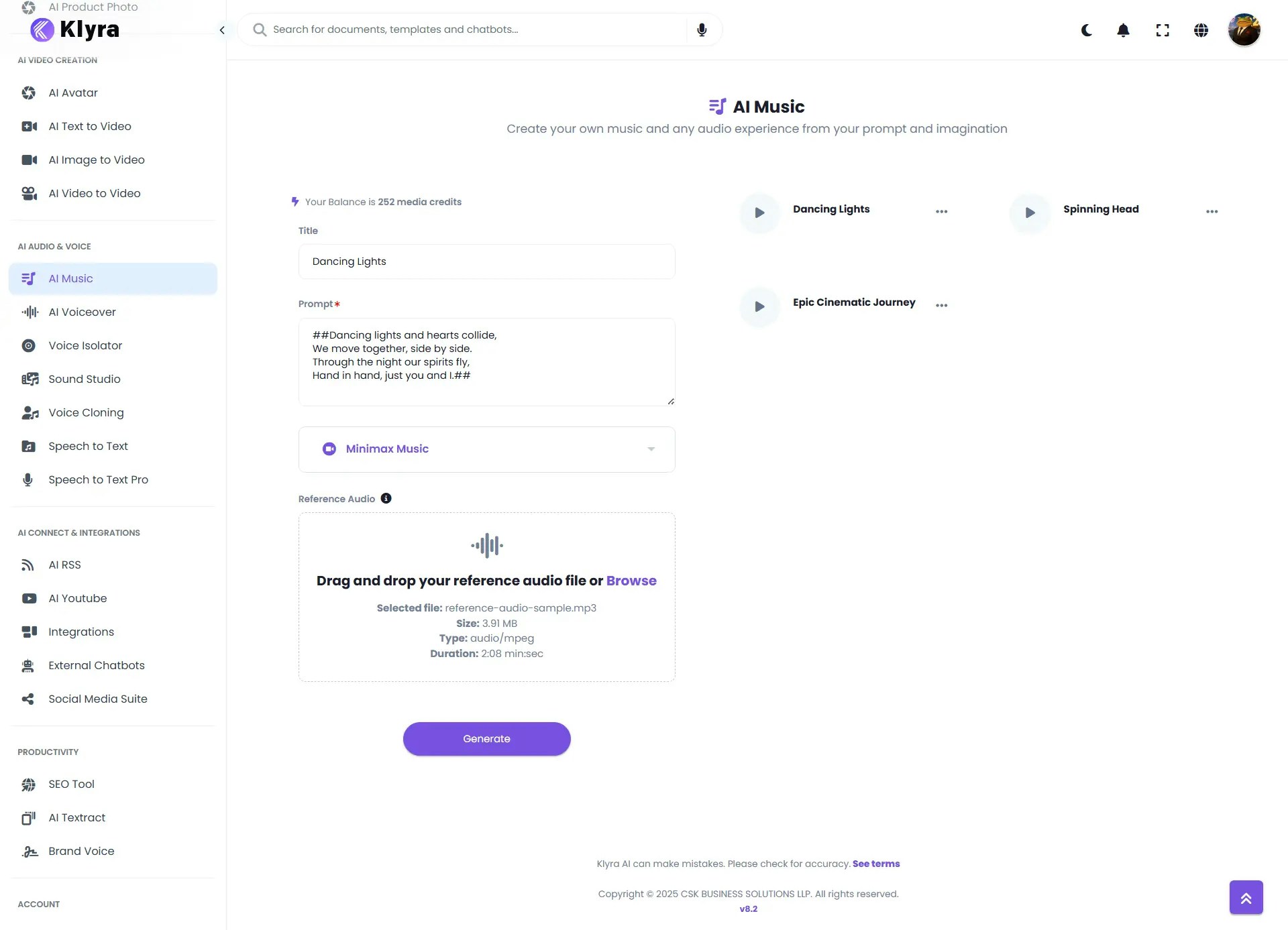 ## How to Use
> 🔎 **Navigation:** Dashboard → Left Panel → AI Audio & Voice → AI Music
You can choose between:
* **Stable Audio** → Best for instrumentals, soundscapes, and musical structures.
* **Minimax Music** → Best for songs with vocals, genre-rich compositions, and style-matching from reference tracks.
> ⚡ Settings and options change dynamically based on your selection.
1. Enter a **Title** for your music generation task.
2. Write your **Prompt** — be as descriptive as possible (e.g., *“A powerful orchestral soundtrack with soaring strings, deep percussion, and a heroic brass section. Starts softly with piano, builds into an epic climax with drums and horns, ending with a calm fade.”*).
3. Ensure **Stable Audio** is selected.
4. Set **Total Seconds** → Maximum is **47 seconds**.
5. Set **Steps** (for denoising/refinement) or leave default. → Default is 50.
6. Click **Generate**.
**Key Features of Stable Audio:**
* Generates at **44.1 kHz stereo**.
* Produces **intro, development, and outro** with coherent structure.
* Great for **melodies, background music, and sound effects**.
1. Enter a **Title** for your music generation task.
2. **Enter your Prompt or Lyrics** — describe the style, mood, or write short lyrics. If you’re adding lyrics, wrap them in `##` at the beginning and end, like this:
* (e.g., *“##Dancing lights and hearts collide,*
*We move together, side by side.*
*Through the night our spirits fly,*
*Hand in hand, just you and I.##”*).
3. Ensure **Minimax Music** is selected.
4. Upload a **Reference Audio** file to guide the style and feel of your music. Make sure the clip is at least 15 seconds long.
5. Click **Generate**.
**Key Features of Minimax Music:**
* Simultaneous **accompaniment + vocals**.
* Upload reference tracks to **mimic style**.
* Converts **lyrics into music**.
* Supports multiple genres (pop, rock, classical, electronic, etc.).
* Maximum output length = **60 seconds**.
* Once generated, your music will appear under **Results**.
* You can **Play, Download, or Delete** the tracks.
* All results are also saved under **AI Panel → Documents → All Voiceovers (audio category)** for future access.
## 🎵 Stable Audio Example
Here’s how you can create an AI music track using **Stable Audio**.
* **Music Title:** Epic Cinematic Journey
* **Prompt:** “A powerful orchestral soundtrack with soaring strings, deep percussion, and a heroic brass section. Starts softly with piano, builds into an epic climax with drums and horns, ending with a calm fade.”
* **Settings Used:**
* Model: Stable Audio
* Duration: 30 seconds
* Steps: 50
**Output:**\
The generated track begins with soft piano notes, gradually building tension with layered strings and percussion. The middle section swells with dramatic brass and pounding drums, before tapering off into a peaceful, orchestral fade — just as described in the prompt.
## 🎵 Minimax Music Example
Here’s how you can create an AI music track using **Minimax Music**.
* **Music Title:** Dancing Lights
* **Reference Audio:** reference-audio-sample.mp3 (≥15s, with music + vocals)
Reference Audio
* **Prompt (Lyrics):**
\##Dancing lights and hearts collide,
We move together, side by side.
Through the night our spirits fly,
Hand in hand, just you and I.##
* **Settings Used:**
* Model: Minimax Music
* Prompt contains short lyrics wrapped in `##`
* Reference audio guides style and tone
**Output:**\
The generated track blends the melodic patterns of the reference audio with the new lyrics. Bright synth layers and a driving beat highlight the “dancing lights” theme, while vocal melodies interpret the provided lines. The result is a catchy, uplifting electronic track that captures the feeling of togetherness and motion described in the lyrics.
### 💡 Tips
* **Be descriptive** in your prompts — include genre, instruments, mood, and tempo.
* **Use Stable Audio** for instrumental or cinematic music.
* **Use Minimax Music** when you want full songs with vocals.
* **Experiment with reference tracks** in Minimax to achieve stylistic accuracy.
* **Keep duration in mind** — 47s (Stable Audio) vs. 60s (Minimax).
* **Save and organize** results into workbooks for specific projects (podcasts, campaigns, etc.).
***
### 📌 Example Use Cases
* **Content Creators** → Generate background scores for YouTube videos or Instagram reels.
* **Podcasters** → Create unique intro/outro music or ambient loops.
* **Musicians** → Experiment with new melodies, chord progressions, or song drafts.
* **Marketers** → Produce catchy jingles or short branded tracks for ad campaigns.
* **Game Developers** → Generate atmospheric soundscapes for game environments.
* **Educators** → Create engaging audio cues or teaching songs for learning modules.
## How to Use
> 🔎 **Navigation:** Dashboard → Left Panel → AI Audio & Voice → AI Music
You can choose between:
* **Stable Audio** → Best for instrumentals, soundscapes, and musical structures.
* **Minimax Music** → Best for songs with vocals, genre-rich compositions, and style-matching from reference tracks.
> ⚡ Settings and options change dynamically based on your selection.
1. Enter a **Title** for your music generation task.
2. Write your **Prompt** — be as descriptive as possible (e.g., *“A powerful orchestral soundtrack with soaring strings, deep percussion, and a heroic brass section. Starts softly with piano, builds into an epic climax with drums and horns, ending with a calm fade.”*).
3. Ensure **Stable Audio** is selected.
4. Set **Total Seconds** → Maximum is **47 seconds**.
5. Set **Steps** (for denoising/refinement) or leave default. → Default is 50.
6. Click **Generate**.
**Key Features of Stable Audio:**
* Generates at **44.1 kHz stereo**.
* Produces **intro, development, and outro** with coherent structure.
* Great for **melodies, background music, and sound effects**.
1. Enter a **Title** for your music generation task.
2. **Enter your Prompt or Lyrics** — describe the style, mood, or write short lyrics. If you’re adding lyrics, wrap them in `##` at the beginning and end, like this:
* (e.g., *“##Dancing lights and hearts collide,*
*We move together, side by side.*
*Through the night our spirits fly,*
*Hand in hand, just you and I.##”*).
3. Ensure **Minimax Music** is selected.
4. Upload a **Reference Audio** file to guide the style and feel of your music. Make sure the clip is at least 15 seconds long.
5. Click **Generate**.
**Key Features of Minimax Music:**
* Simultaneous **accompaniment + vocals**.
* Upload reference tracks to **mimic style**.
* Converts **lyrics into music**.
* Supports multiple genres (pop, rock, classical, electronic, etc.).
* Maximum output length = **60 seconds**.
* Once generated, your music will appear under **Results**.
* You can **Play, Download, or Delete** the tracks.
* All results are also saved under **AI Panel → Documents → All Voiceovers (audio category)** for future access.
## 🎵 Stable Audio Example
Here’s how you can create an AI music track using **Stable Audio**.
* **Music Title:** Epic Cinematic Journey
* **Prompt:** “A powerful orchestral soundtrack with soaring strings, deep percussion, and a heroic brass section. Starts softly with piano, builds into an epic climax with drums and horns, ending with a calm fade.”
* **Settings Used:**
* Model: Stable Audio
* Duration: 30 seconds
* Steps: 50
**Output:**\
The generated track begins with soft piano notes, gradually building tension with layered strings and percussion. The middle section swells with dramatic brass and pounding drums, before tapering off into a peaceful, orchestral fade — just as described in the prompt.
## 🎵 Minimax Music Example
Here’s how you can create an AI music track using **Minimax Music**.
* **Music Title:** Dancing Lights
* **Reference Audio:** reference-audio-sample.mp3 (≥15s, with music + vocals)
Reference Audio
* **Prompt (Lyrics):**
\##Dancing lights and hearts collide,
We move together, side by side.
Through the night our spirits fly,
Hand in hand, just you and I.##
* **Settings Used:**
* Model: Minimax Music
* Prompt contains short lyrics wrapped in `##`
* Reference audio guides style and tone
**Output:**\
The generated track blends the melodic patterns of the reference audio with the new lyrics. Bright synth layers and a driving beat highlight the “dancing lights” theme, while vocal melodies interpret the provided lines. The result is a catchy, uplifting electronic track that captures the feeling of togetherness and motion described in the lyrics.
### 💡 Tips
* **Be descriptive** in your prompts — include genre, instruments, mood, and tempo.
* **Use Stable Audio** for instrumental or cinematic music.
* **Use Minimax Music** when you want full songs with vocals.
* **Experiment with reference tracks** in Minimax to achieve stylistic accuracy.
* **Keep duration in mind** — 47s (Stable Audio) vs. 60s (Minimax).
* **Save and organize** results into workbooks for specific projects (podcasts, campaigns, etc.).
***
### 📌 Example Use Cases
* **Content Creators** → Generate background scores for YouTube videos or Instagram reels.
* **Podcasters** → Create unique intro/outro music or ambient loops.
* **Musicians** → Experiment with new melodies, chord progressions, or song drafts.
* **Marketers** → Produce catchy jingles or short branded tracks for ad campaigns.
* **Game Developers** → Generate atmospheric soundscapes for game environments.
* **Educators** → Create engaging audio cues or teaching songs for learning modules.